

Overhead Crane Remote Control Failure: Electrical Guide
Key Point Remote control failure and electrical system faults are the most common issues encountered during daily crane operations. The four leading causes of remote control failure are: ① Low battery (60%); ② Damaged or interfered antenna (15%); ③ Water damage or physical impact to the remote (10%); ④ Blown fuse in the receiver (5%). Common electrical system faults include: ① Contactor failure to close or welded contacts; ② Poor contact between the conductor rail and current collector; ③ Cable fracture or loose terminal connections; ④ PLC module faults. Troubleshooting follows a three-step sequence: "Check the battery first, then the indicator lights, and finally the receiver." Kelude overhead cranes come standard with industrial-grade remote controls (IP65 waterproof), and the receiver is rated IP54 Protection.
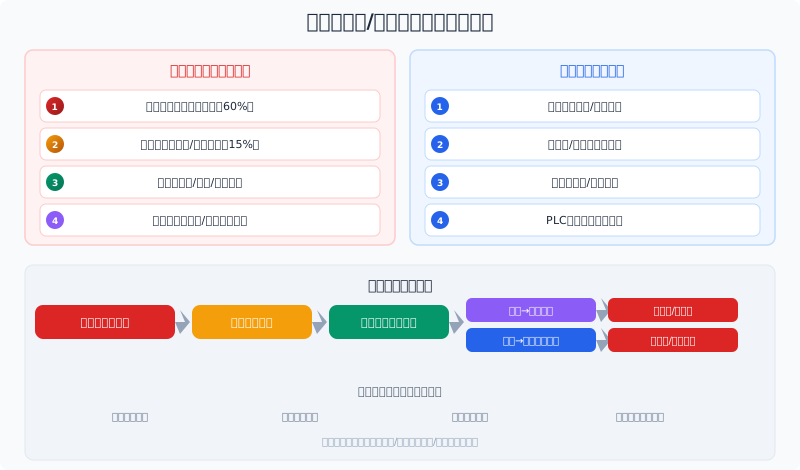
Remote Control Malfunction: Root Causes Explained
① Low Remote Control Battery (60% of Cases)
A depleted battery is the most frequent cause of remote control failure. Symptoms include a dim or unresponsive indicator light after pressing buttons, noticeably reduced operating range, and intermittent button response. Most industrial remote controls use rechargeable NiMH battery packs or lithium batteries, whose capacity degrades over time. Kelude recommends: ① checking the remote control battery voltage monthly; ② keeping a fully charged spare battery on hand; ③ replacing the battery as soon as the operating range drops to half of its original distance.
② Damaged Antenna or Signal Interference (15% of Cases)
A bent or broken antenna on either the remote control or the receiver shortens the signal transmission and reception range. Signal shielding can also occur when the receiver is mounted inside a metal electrical cabinet. Nearby high-power VFDs, welding machines, and other equipment can generate electromagnetic interference. Solutions: inspect the antenna for damage (the remote control antenna should be fully extended), and ensure the receiver antenna is positioned outside the electrical cabinet, away from VFDs.
③ Water Damage or Physical Impact (10% of Cases)
A dropped remote control can suffer from cracked circuit boards, damaged crystal oscillators, or faulty button contacts. Water ingress leads to circuit board corrosion, causing erratic button behavior or a complete loss of function. Kelude standard remote controls are IP65 waterproof and can withstand a drop onto concrete from 1 meter. However, we still recommend: ① attaching the safety lanyard to the remote during operation; ② storing the remote in its designated case when not in use.
④ Receiver Power Module Failure (5% of Cases)
A blown fuse or a failed power module in the receiver will render it inoperative. Check the indicator light on the receiver panel: if the light is on, power is normal; if it is off, inspect the fuse and power module. When replacing the fuse, always use one of the same specification (typically 2–5A). Kelude receiver power modules feature a wide voltage input design (AC 85–265V) to accommodate unstable power grids.
Common Electrical System Faults and Troubleshooting
① Contactor Failure to Close or Welded Contacts
A contactor may fail to close due to a burned-out coil or insufficient voltage. Conversely, repeated high-current switching can cause arcing that welds the contacts together. Inspection method: listen for the characteristic "click" of the contactor closing when power is applied. No click indicates a problem with the coil voltage or circuit; a click with no-load operation suggests burned contacts. Kelude uses Schneider and Chint contactors with a contact life of ≥1 million cycles. A contactor with welded contacts must be replaced.
② Poor Contact Between Conductor Rail and Current Collector
Uneven joints in the conductor rail, worn carbon brushes on the current collector, or insufficient spring pressure can cause intermittent or complete power loss. This often manifests as a fault occurring only when the crane travels to a specific position. Periodically inspect the carbon brush wear amount (replace when the brush length is less than 1/3 of its original size) and clean dust accumulation from the conductor rail surface. Kelude current collector carbon brushes typically last 6 to 12 months.
③ Cable Fracture or Loose Terminals
Vibration from continuous crane operation can loosen terminal block connections, while cables can wear and fracture as the trolley drags them. Suspended cables are particularly prone to breakage at the cable trolley due to repeated bending. Inspect all terminal connections for tightness and check cable sheathing for signs of wear. Kelude uses high-flex drag chain cables rated for ≥5 million bending cycles.
④ PLC Input/Output Module Faults
A faulty PLC I/O point can result in lost control signals. A typical symptom: pressing a button on the remote control causes the PLC input indicator to light up, but the corresponding output does not activate. Check the status of the input and output indicator lights to isolate the faulty point.
Remote Control Frequency Setting and Pairing
Frequency Selection: Common frequencies for industrial remote controls include 315MHz (general purpose), 433MHz (better penetration), 868MHz (European Standard / EN), and 2.4GHz (high-speed frequency hopping for interference resistance). When multiple cranes operate in the same area, they must use different frequency channels or employ frequency hopping technology, with each unit assigned a unique address code (supporting up to 256 units on site). Kelude standard equipment includes a 2.4GHz frequency hopping remote control (F23 series) that automatically avoids interfering frequencies.
Pairing Procedure: Pairing is required for a new remote control or after replacing the receiver: ① Turn on the pairing switch on the receiver. ② Press a specific combination of buttons on the remote control (e.g., simultaneously pressing Up + Left). ③ Wait for the receiver indicator light to stop flashing rapidly. ④ Pairing is complete. Each remote control has a unique ID code, and the receiver will only respond to paired units. Kelude remotes are paired before delivery; pairing guidance is provided when a replacement remote is needed.
Emergency Handling: If the remote control fails and emergency operation is required: ① Check if the emergency stop button on the remote is pressed (twist to release); ② Use a spare remote control (if available); ③ Use the operator console in the cabin (it is recommended that all cranes retain cabin operation capability).
Troubleshooting Precautions
Frequently Asked Questions
Q: Remote control buttons don't respond but the indicator light is on—what's wrong?
A: A lit indicator means the remote is receiving power. Possible causes: ① The pairing between the remote and receiver has been lost (re-pair required); ② Transmitter circuit fault (damaged crystal oscillator); ③ Receiver module failure. Kelude recommends keeping a pre-paired spare remote on hand for quick replacement in an emergency.
Q: The overhead crane only travels in one direction—how do I fix it?
A: A single-direction failure is usually not a remote control issue but a control circuit fault. Common causes: ① The contactor coil for that direction is burned out or the contacts won't close; ② A travel limit switch has tripped and not reset; ③ The control relay for that direction is defective. Kelude recommends checking the travel limit switch for the affected direction first.
Q: The conductor rail keeps arcing—what should I do?
A: Arcing on the conductor rail can be caused by: ① Severely worn carbon brushes on the current collector (insufficient spring pressure); ② Uneven conductor rail joints; ③ Oxidized or contaminated rail surface; ④ Excessive vibration during crane operation causing the current collector to bounce. Kelude recommends replacing the carbon brushes (approx. $4–$7 each) and cleaning the rail joints.
Q: Why does the contactor trip frequently?
A: Frequent tripping can result from: ① Motor overload (check for overloading or brake drag); ② Deteriorated motor insulation (insulation resistance below 0.5 MΩ); ③ Thermal overload relay setpoint too low; ④ Poor contactor contact condition causing overheating. Kelude sets thermal overload relays at 1.05–1.1 times the motor's rated current.
This completes our guide to overhead crane remote control failures and electrical system troubleshooting. Kelude cranes come standard with industrial-grade remote controls (IP65 waterproof) and high-quality electrical components (Schneider contactors/PLC), and we offer remote pairing, electrical system repair, and conductor rail maintenance services. For any electrical fault, please contact the Kelude after-sales technical team.
