

Overhead Crane Remote Expert Diagnostic System
Remote expert diagnostic system for overhead cranes cuts troubleshooting from days to real time using 5G, HD cameras, and AR glasses.
When an overhead crane breaks down and the in-house team can't fix it, the plant has to wait for the manufacturer's engineer to arrive. That wait typically runs one to three days—the engineer is traveling while the production line sits idle. A single crane down for one day halts the entire downstream line, with losses mounting by the hour.
Remote Diagnostics is built to eliminate that downtime. Field technicians use HD cameras, microphones, and AR glasses over a 5G connection to stream live video and audio of the fault site to a remote expert. The expert simultaneously reviews the crane's operating data—vibration, temperature, and Current—alongside the live feed to make a joint assessment. Roughly 90% of common faults can be diagnosed remotely within 30 minutes, with a recommended action plan delivered on the spot.
| Function Module | Technical Solution | Implementation Method |
|---|---|---|
| HD Video Call | 5G/4GHD Video Streaming | Head-Mounted Camera+Noise-Canceling Microphone |
| Remote ARAnnotation | Web RTC+AROverlay | Expert Drawing Lines on Screen/Arrow/Text |
| Sensor Data Synchronization | MQTT/OPC UA | Real-Time Vibration/Temperature/Current Curve |
| Maintenance Record Query | Cloud Knowledge Base | Historical Troubleshooting Records for Similar Faults |
Hardware Investment: On-site equipment (head-mounted camera + noise-cancelling headphones + handheld terminal) costs approximately $1,200–$2,200 per set. The expert end only requires a standard computer with a webcam. The 5G network leverages the plant's existing infrastructure—no additional network deployment is needed.
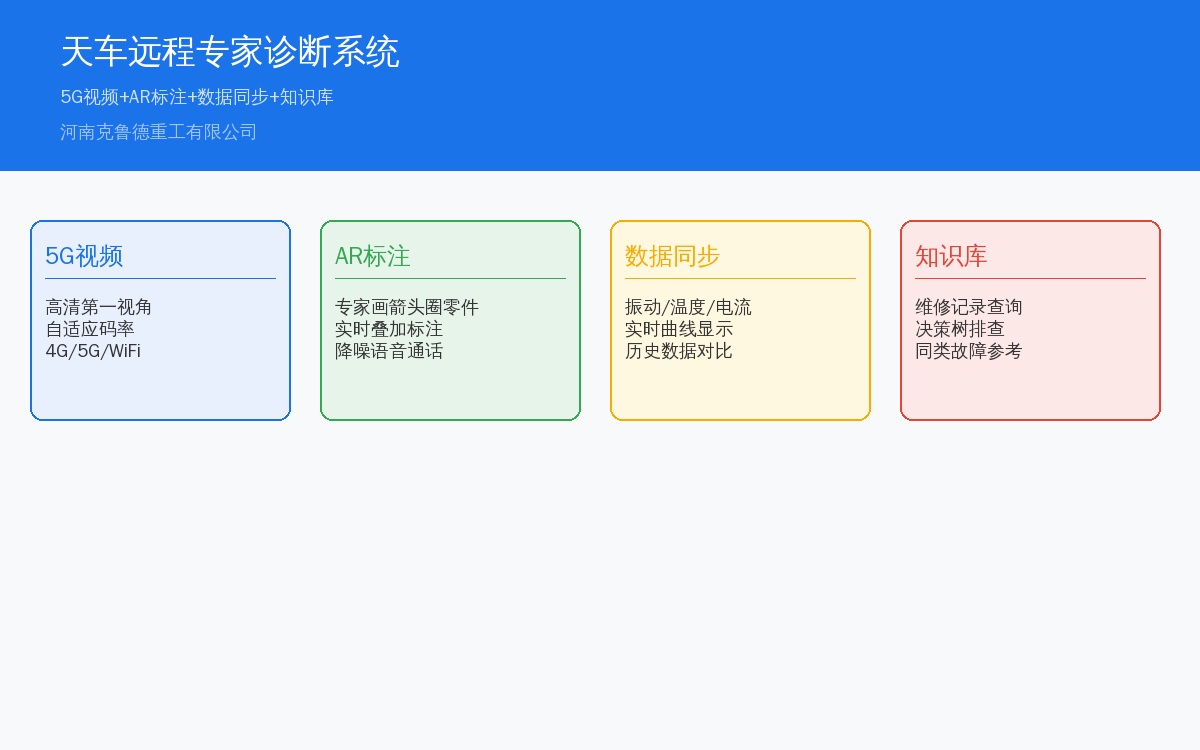
System Architecture for Overhead Crane Remote Diagnostics
The remote expert diagnostic system for overhead cranes comprises three tiers: the on-site layer, the network transport layer, and the remote expert layer. The on-site layer is stationed at a maintenance workstation near the crane. Its core hardware is a head-mounted HD camera (1080P/30fps with autofocus) paired with a noise-cancelling headset—once a maintenance technician wears the device at the fault location, the expert end receives a real-time, first-person view of the crane's fault area along with live audio. Simultaneously, an on-site edge computing gateway collects real-time crane operating data from the PLC via OPC UA (hoisting motor vibration, gearbox temperature, mechanism currents, travel speed, etc.), which is compressed and transmitted in sync with the video stream.
The network transport layer runs on the plant's existing 5G/4G industrial network and supports adaptive bitrate streaming—when network conditions are good, 1080P HD video and sensor data are transmitted together; when bandwidth drops, the system automatically downgrades to 480P standard definition while maintaining clear voice communication. The remote expert end is deployed at the manufacturer's technical support center or the plant's equipment management office, requiring nothing more than a standard office PC and a webcam. The expert software interface displays three panels simultaneously—the top-left shows the live on-site video (with AR annotation overlay), the top-right displays real-time operating data curves for the crane (with 30-minute history playback), and the bottom panel presents a knowledge base of historical troubleshooting records for similar faults. The design philosophy is "minimize on-site burden, maximize expert leverage"—the on-site technician needs no diagnostic expertise, simply wearing the equipment and following the expert's instructions.
Hardware Selection for Industrial Crane Inspection
For the on-site head-mounted camera, we recommend three field-proven models: PivoPod S1 ($740, 1080P@30fps, IP54 Protection Rating, built-in noise-cancelling microphone, 4-hour battery life, magnetic quick-mount for safety helmets), Simeng M1 ($440, 1080P@25fps, IP65 Protection Rating, designed for dusty and humid environments, 3-hour battery life, Type-C charging with power-bank support for extended operation), and Vuzix M400 ($1,180, AR smart glasses—not just a camera, but an integrated micro-display that overlays expert annotations directly onto the lens, ideal for complex repairs requiring hands-free operation). A complete on-site kit costs approximately $1,200–$2,200 per set, and we recommend 2–3 sets per workshop for rotation. Each kit includes the head-mounted camera, noise-cancelling headphones, charger, and spare battery.
For the 5G industrial gateway, we recommend the ZTE MC801A ($300) or Huawei 5G CPE Pro 2 ($370), both supporting 5G SA/NSA dual-mode and Wi-Fi 6, forwarding wired network signals from the camera and edge computing node near the crane to the 5G base station. For the edge computing node, the Advantech UNO-2271G ($440–$740, Intel Atom x5-E3930 dual-core CPU, 4GB RAM, 128GB SSD, 2×GbE + 2×COM) or Siemens IoT2050 ($520, running Yocto Linux with Node-RED and OPC UA client pre-installed) are solid choices. The edge node collects PLC operating data (via OPC UA/Fetch Write protocol), packages it into MQTT/HTTP payloads, and uploads it alongside the video stream. It also provides local data buffering—caching up to 30 minutes of data during network outages and automatically resuming transmission once connectivity is restored. The expert end only needs a standard office PC (i5 or better CPU, 8GB RAM, Windows 10/11) with a 720P webcam. For software, TeamViewer Business ($74/month) or the open-source Jamulus solution (free, requires self-hosted WebRTC signaling server) are recommended.
Remote Diagnosis Workflow for Overhead Cranes
A complete remote diagnostic session follows a four-step process: First, the on-site technician detects a fault and initiates a call to the remote expert center via a mobile app or direct voice call. Second, the head-mounted camera auto-connects, giving the expert a first-person view on their screen. Third, the expert simultaneously pulls up the crane's operating data (vibration/temperature/current curves from the last 30 minutes) and makes a comprehensive assessment alongside the live footage. Fourth, the expert annotates the fault location and inspection steps directly on the video feed, and the on-site technician follows the on-screen instructions.
The entire process—from initial call to diagnostic conclusion—averages 15–30 minutes, with actual diagnosis taking no more than 10 minutes; the remainder is execution time for the technician. Compared to the traditional workflow of "calling to describe the issue, taking photos, sending them via WeChat, waiting for the expert to call back, and describing everything again," the efficiency gain is substantial.
Technical Configuration Checklist
| Equipment | Recommendation Model | Unit Price | Quantity |
|---|---|---|---|
| Head-Mounted Camera | Pivo Pod S1/Simeng M1 | Approx.3000~5000CNY | Per Workshop2~3Set |
| noise-cancelling headphones | 3M PELTOR | Approx.1500CNY | Per Set Includes1Unit(s) |
| Expert Client Software | Team Viewer/Proprietary Platform | Approx.500~2000CNY/Month | 1Set |
| Data Acquisition Module | Edge Computing Gateway | Approx.3000~5000CNY | Per Unitoverhead crane1Unit(s) |
Implementation Roadmap
Phase 1 — Pilot Program: Deploy 2 head-mounted cameras and 1 expert-side software license in a single workshop. Train 2–3 maintenance technicians on the equipment. Run the pilot for one month and document typical cases, including the number and type of faults resolved remotely.
Phase 2 — Evaluate & Scale: Assess pilot results to decide whether to roll out further. If remote troubleshooting resolves more than 5 faults within the first month — saving 5 engineer site visits — the return on investment is already clear.
Phase 3 — Integrate Crane Data: Connect the system to overhead crane operational data, allowing experts to view vibration and temperature curves in real time for more accurate diagnosis.
