

Overhead Crane HMI Too Cluttered? 3 Ways to Optimize Layout & Alarms
Three key principles for overhead crane HMI design: functional zoning (60% control area + 35% status area + 5% status bar), tiered fault alerting (three-level color coding + auto pop-ups + audible/visual alarms), and clear data display (sans-serif font ≥12px + highlighted numerals + consistent units). Kelude's KR-HMI system is built around a 15-inch industrial touch screen with glove-friendly operation, IP65 protection, and a -20 to 60°C operating range — validated across 200+ overhead crane installations.
The overhead crane HMI (Human-Machine Interface) is the operator's primary window into the crane's operation. A well-designed HMI lets the operator locate any control within 3 seconds, assess crane status in 5 seconds, and diagnose a fault in 10 seconds. Conversely, cluttered layouts, undersized buttons, and inconsistent color schemes significantly increase the risk of operator error. This article examines HMI design from three angles — functional zoning, tiered fault alerting, and data presentation — drawing on Kelude's field experience with the KR-HMI system deployed on 200+ overhead cranes to offer practical engineering guidance.
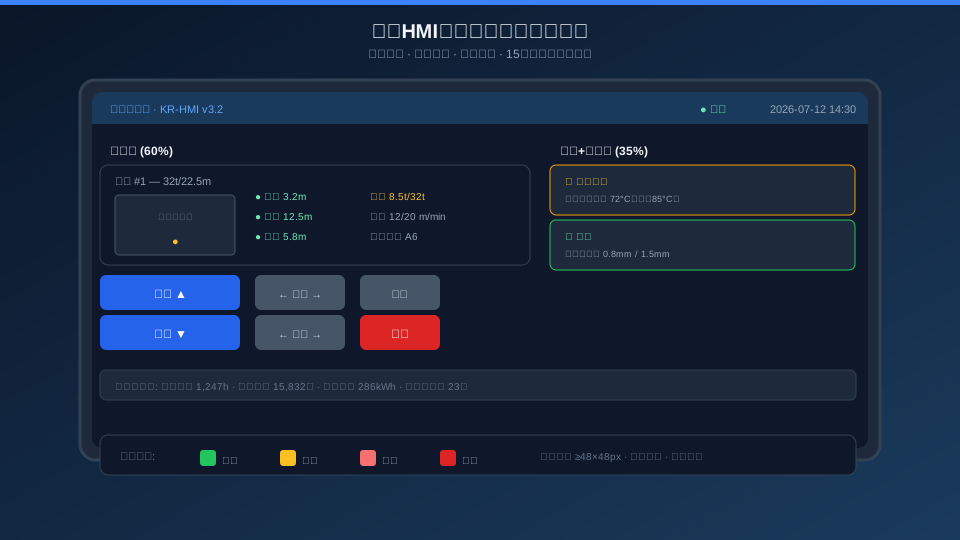
1. Functional Zoning: Layout Principles for Crane HMI Screens
Screen real estate on an overhead crane HMI is limited — a typical 15-inch touch screen offers 1024×768 or 1280×800 resolution — so how do you allocate space among controls, status readouts, and alarms? Kelude's KR-HMI uses a proven three-zone layout: the control zone occupies 60% of the screen (upper-left to center-left) and holds the crane status diagram, hoist/crane bridge/trolley controls, and mode selection; the status zone takes 35% (upper-right to center-right) and displays real-time parameters for each mechanism, the active alarm list, and maintenance information; a 5% status bar along the bottom shows system runtime, cumulative lift count, daily energy consumption, and maintenance countdown. Button placement follows a "top-left priority" rule — hoisting and lowering controls sit at the top of the control zone, consistent with ergonomic conventions for primary actions, while travel and auxiliary controls are arranged top-to-bottom by frequency of use.
| Zone | Area Ratio | Position | Content | Interaction Method | Refresh Frequency |
|---|---|---|---|---|---|
| Operation Area | 60% | Left Side+Center | overhead crane Schematic Diagram·Control Button·Mode Switch·speed Setting | Touch Tap+Long Press | Real-time(50ms) |
| Status Area | 35% | Right Side | Load/Height/speed·Alarm List·Maintenance Information | Read-only(Scrollable) | Real-time(100ms) |
| Status Bar | 5% | Bottom | System Time·Communication Status·Operation Statistics·Maintenance Countdown | Read-only | 1s |
Button Size Specification: Touch control buttons require a minimum size of 48×48 px (approx. 12.7×12.7 mm at 96 DPI), with a minimum spacing of 8 px between adjacent buttons. Critical operation buttons such as Hoisting and Lowering are enlarged to 64×48 px. The Emergency Stop Button is a special red circular button with a diameter of at least 72 px, positioned in the upper-right corner of the operating area (away from other controls to prevent accidental activation). Every button press must provide visual feedback (color change on press + release animation within ≤200 ms) and tactile feedback (short buzzer beep).
2. Fault Level Display — Visual Coding from Warning to Shutdown
Overhead cranes can generate more than 50 distinct alarm types during operation. Displaying all of them on screen at once would only overwhelm the operator. Kelude's KR-HMI employs a three-level fault display system that uses color coding and automatic pop-up mechanisms to help operators quickly identify alarm severity and respond accordingly.
| Grade | Color Code | Display Mode | Audible Alert | Operation Response | Typical Example |
|---|---|---|---|---|---|
| L1 Normal | Green #22c55e | Status Area Icon | None | Normal Operation | All Parameter Within Normal Range |
| L2 Warning | Yellow #f59e0b | Status Area List+Flashing Border | Intermittent Short Beep(500ms) | Operation Allowable | Motor Temperature72/85°C·Brake Wear |
| L3 Alarm | Red #ef4444 | Full-screen Popup+Status Area Pin | Continuous Buzzer(Acknowledgment Required) | Automatic Speed Limit50% | Overload110%·Limit Trigger·Frequency Inverter / VFDFault |
| L4 E-stop | Dark Red #b91c1c | Exclusive Full-screen+Text Flashing | Continuous High-pitch Buzzer | Immediate Shutdown | Emergency Stop Button Press·Overload125%·Brake Failure |
Alarm History Log: All alarm events are automatically recorded to the HMI's local storage (circular buffer retaining the most recent 10,000 entries), with each record capturing the alarm type, trigger time, recovery time, and operator acknowledgment. Operators can review past alarms via the "Alarm History" button in the status area. Kelude's KR-HMI alarm system also pushes alarms to the big data platform via MQTT, integrating with the remote driving cabin—alarms on the operator console trigger audible and visual alerts on the remote workstation.
3. Display Optimization: Balancing Information Density and Readability
An overhead crane HMI must display more than 20 real-time parameters simultaneously (load, lifting height, crane bridge position, trolley position, mechanism speeds, motor current/temperature, brake status, cumulative operating hours, etc.). How can operators quickly locate critical information at a glance? Kelude's KR-HMI display specification addresses this as follows:
Minimum Text Sizes: Chinese body text ≥12px (SimSun/Microsoft YaHei), numeric parameters ≥16px (Consolas monospace for quick value comparison), and button labels ≥14px. Key parameters (load, height, speed) are enlarged to 20–24px with a semi-transparent dark card background for emphasis. Data follows the standard "Name + Value + Unit" format (e.g., "Load 8.5t / 32t"), with units using industry-standard abbreviations (t, m, m/min, °C, A, kW, kWh).
Numeric Display Accuracy: Load is shown to 0.1t (for a 32t capacity), height to 0.1m (for a 20m range), speed as whole m/min (hoisting 0–20m/min, travel 0–40m/min), current to 1A (for a 100A range), and temperature as whole °C. Excessive precision adds no value and only hampers readability. Comparative displays outperform absolute values—for instance, "8.5t / 32t" lets operators gauge the load factor (26.6%) far more intuitively than a standalone "8.5t." Kelude's KR-HMI overlays percentage progress bars on load and temperature backgrounds (green 0–80%, yellow 80–95%, red 95–100%), enabling operators to assess safety margins at a glance.
48px Touch Buttonminimum Dimension Approx.12.7mm, Glove-operable | 4Level Fault Classification Hierarchy Normal/Warning/Alarm/E-stop | 60% Operation Area Ratio Centralized Placement of Core Control Buttons |
200ms Button Feedbacklatency Color Change on Press+Tactile Confirmation | 10,000Entries Alarm Log Capacity Circular Storage, traceable | 200+Units KR-HMIDeployment Quantity Steel/Chemical/Building Materials Validation |
4. Parameter Setup Interface — A Safe Entry Point for Maintenance Personnel
The Parameter Setup interface is the most privileged area of the HMI, housing configuration items that directly affect equipment safety, including VFD parameters, limit thresholds, overload settings, and PID parameters. Kelude's KR-HMI parameter setup interface follows a three-tier access control model (Operator / Maintenance Engineer / Administrator), with each tier secured by dual-factor authentication combining a password and PIN. Operators have read-only access to view parameters; Maintenance Engineers can modify non-safety-critical parameters (acceleration/deceleration time, speed limits); Administrators have full access, including limit thresholds and overload settings. Every parameter change is automatically logged with the user ID, timestamp, and before/after values.
Setup Interface Interaction Guidelines: Numeric entry uses a pop-up digital keypad (keys ≥ 54×54 px) with step buttons (±1/±10/±100 increments), supporting both direct touch input and rotary knob adjustment. Modifying safety-critical parameters (e.g., overload setpoints) triggers a secondary confirmation dialog that requires the user to enter a reason for the change. If a parameter value falls outside the safe range, the input field border turns red and saving is blocked. The current access level and remaining session time are always displayed in the upper-left corner of the interface (auto-lock after 5 minutes of inactivity). Kelude's KR-HMI parameter setup interface also supports remote parameter adjustment via the touch screen in the remote operator station — for more on remote operation, see Overhead Crane Remote Operator Station: Technical Breakdown. For full HMI system details, refer to Complete Remote Control Platform for Overhead Cranes.
Frequently Asked Questions About Crane HMI Touch Screens
Q: What if the HMI touch screen is hard to read in direct sunlight?
A: Kelude's KR-HMI offers an outdoor high-brightness display option: 1,000 nits brightness (vs. 300–500 nits on standard industrial screens), optical bonding (to reduce internal reflection), and anti-glare AG treatment (25% haze value). Screen readability under direct sunlight has been validated through wide-temperature testing from -20°C to 60°C. If ambient light is still too strong, the HMI's "Night Mode" (inverted color scheme — white text on dark background) can be enabled. We also recommend mounting the operator station away from direct sunlight, preferably on the shaded side of the crane operator cabin.
Q: Can operators use the touch screen while wearing thick gloves?
A: Yes. The KR-HMI uses projected capacitive (PCAP) touch technology that supports gloved operation (glove thickness up to 3 mm; cotton or thin leather gloves recommended). Touch sensitivity is adjustable across 5 levels, with the factory default set to level 3 (capable of registering touches through a 2 mm glove). If operators must wear heavy cut-resistant gloves (>3 mm), we recommend adding a physical button expansion panel (8 mechanical buttons + 1 Emergency Stop Button) connected via USB or GPIO as a redundant backup to touch input. Resistive touch screens are not recommended due to shorter lifespan, lower light transmittance, and lack of multi-touch support.
Q: Does the KR-HMI support multiple languages?
A: Yes. The KR-HMI comes with built-in English and Chinese interfaces, switchable with one tap in the settings menu. All text on the Chinese interface uses vector fonts (not bitmap), with full GB18030 character set coverage. The UI layout adapts automatically when switching languages — since English text runs about 30% longer than Chinese on average, button widths adjust dynamically (increasing by 20% in English mode). Kelude also offers custom localization for Russian, Spanish, and other languages, with a typical cost of approximately $740–$1,480 per language and a lead time of 2–3 weeks.
Q: Can an HMI be retrofitted to an older overhead crane?
A: Yes. Kelude's HMI retrofit solution is compatible with cranes that already have PLC control (Siemens S7-1200/1500, Mitsubishi FX5U, Inovance AC800 series, etc.). The HMI communicates with the PLC via Profinet, Modbus TCP, or RS485 without altering the existing PLC program — only a data mapping DB block needs to be added to the PLC to expose the monitored and controlled parameters to the HMI communication area. A typical retrofit on an existing crane takes 1–2 days per unit (including HMI mounting, communication setup, and interface commissioning) without disrupting normal production. For cranes without a PLC (e.g., cam controller speed control), a full upgrade to PLC control is required — a combined PLC + VFD + HMI retrofit package that takes 5–7 days per unit.
The quality of an overhead crane HMI interface design directly impacts operational efficiency and safety. Kelude's KR-HMI system has been field-validated on 200+ overhead cranes, available in three screen sizes: 15-inch standard, 10-inch compact, and 7-inch economy. To request a KR-HMI demo system (a simulation version that runs on Windows PC) or a detailed technical solution, contact the Kelude technical team.
Related Standards
Kelude Heavy Industry: Trusted Overhead Crane Manufacturer
Kelude Heavy Industry is a professional manufacturer specializing in the design, production, and installation of overhead cranes and related material handling equipment. With years of engineering expertise and a commitment to quality, we deliver reliable lifting solutions tailored to the needs of workshops, warehouses, and industrial production lines across the United States and Europe.
Complete Range of Overhead Cranes for Every Application
Our product lineup covers a full spectrum of overhead crane configurations, including single-girder and double-girder designs, top-running and under-running models, as well as explosion-proof and low-headroom variants. Each crane is engineered to meet specific duty classifications and load requirements, ensuring optimal performance in demanding industrial environments.
From small-capacity workshop cranes to heavy-duty units rated for continuous operation, every system is built with high-grade steel structures, precision-machined components, and advanced control technology. We also offer customized solutions to match your existing facility layout and material flow requirements.
Dependable Crane Components and Spare Parts
In addition to complete crane systems, we supply a comprehensive range of crane components and spare parts, including electric hoists, end carriages, crane wheels, rail clamps, buffer stops, and control panels. All parts are manufactured to strict quality standards and are fully compatible with our crane systems, ensuring long service life and easy maintenance.
Our spare parts inventory is maintained to support rapid turnaround times, minimizing downtime for your operations. Whether you need a replacement motor, gearbox, or safety device, our team can identify the correct part and ship it promptly to your facility.
Custom Engineered Lifting Solutions
We understand that every facility has unique lifting challenges. Our engineering team works closely with customers to develop custom crane solutions, whether it involves special span lengths, increased hook height, or integration with existing automation systems. From initial concept through installation and commissioning, we manage the entire project to ensure a seamless fit and trouble-free operation.
Our custom capabilities include multi-crane synchronization, remote control operation, variable-frequency drive (VFD) speed control, and anti-sway technology for precise load positioning. These features enhance safety and productivity in high-throughput environments.
Rigorous Quality Assurance and International Standards
Quality is at the core of everything we do. Our cranes are designed, manufactured, and tested in accordance with internationally recognized standards, including ISO 4301 for crane classification, ISO 12480 for safe use, and IEC 60204-32 for electrical equipment. Each crane undergoes comprehensive load testing and inspection before leaving our facility, ensuring compliance with the highest safety and performance requirements.
We hold certifications that attest to our commitment to quality management and occupational health and safety. Our production processes are continuously audited and improved to maintain consistency and reliability across all product lines.
Global Export Experience and Local Support
With decades of experience in the international market, Kelude Heavy Industry has supplied cranes to customers across North America, Europe, and beyond. Our export team handles all aspects of logistics, documentation, and compliance, making the procurement process straightforward and hassle-free.
We provide comprehensive after-sales support, including installation guidance, operator training, and technical documentation in English. Our responsive customer service team is available to answer questions and provide troubleshooting assistance whenever you need it.
Contact Us for a Custom Quote
Ready to upgrade your material handling capabilities? Contact our sales team today to discuss your requirements and receive a detailed quotation. We are happy to provide technical recommendations, dimensional drawings, and delivery timelines tailored to your project.
