

Overhead Crane HMI Communication: Profinet vs EtherCAT vs Modbus TCP
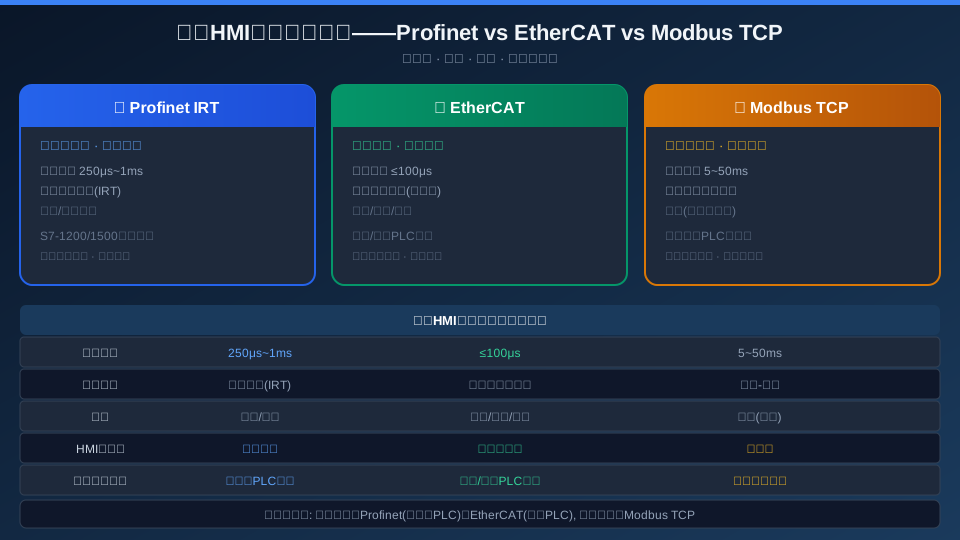
Choosing the right HMI communication protocol for overhead cranes: Profinet IRT is the go-to for Siemens PLCs (250μs–1ms cycle time), EtherCAT for Inovance and Beckhoff PLCs (≤100μs minimum latency), and Modbus TCP for retrofitting existing crane PLCs (most universal, zero configuration cost). All three protocols are supported by the Kelude KR-HMI system, and you can switch between them on the HMI settings screen to match different PLC brands.
The communication protocol between an overhead crane HMI and its PLC is what determines HMI response time and data refresh rate. Choosing the wrong protocol can lead to sluggish HMI updates, data synchronization issues, or even dropped communications. Profinet, EtherCAT, and Modbus TCP are the three most widely used industrial Ethernet protocols, but each has its own strengths and trade-offs in crane applications. This article compares them across five dimensions—cycle time, transmission mechanism, topology, hardware cost, and HMI compatibility—and provides practical recommendations for selecting the right protocol for your crane HMI.
1. Profinet IRT — The Best Choice for Siemens Ecosystems
Profinet is the industrial Ethernet standard championed by Siemens, and IRT (Isochronous Real-Time) is its highest real-time performance grade. IRT uses hardware-based mechanisms to achieve precise cyclic synchronization: all IRT devices send and receive data within a communication cycle according to a strict timing schedule, with cycle jitter of <1μs. When a crane HMI communicates with a Siemens S7-1200/1500 PLC via Profinet, the HMI data refresh cycle can be set to 1ms (synchronized with the PLC's OB1 cycle), enabling "zero-latency" updates of critical parameters such as load, height, and speed on the HMI.
2. EtherCAT — Lowest-Latency Industrial Ethernet
EtherCAT (Ethernet for Control Automation Technology), developed by Beckhoff, uses a "processing on the fly" technique—as the data telegram passes through each slave station, the slave reads/writes its corresponding data in microseconds and forwards it to the next station. EtherCAT's cycle time can go as low as 100μs (well below the 250μs lower limit of Profinet IRT), but in crane HMI applications, the HMI refresh rate is typically set to 1–5ms (the human eye's perception limit for HMI data changes is approximately 16ms/60fps). EtherCAT's low-latency advantage is more relevant to the VFD control loop than to HMI communication.
3. Modbus TCP — The Top Choice for Retrofitting Existing Cranes
Modbus TCP is the most widely deployed industrial communication protocol in the world—bar none—and is natively supported by virtually all industrial PLCs and HMIs. Its cycle time of 5–50ms (depending on the number of data points polled by the HMI and the PLC's response time) is more than sufficient for HMI refresh requirements (16ms or above). Modbus TCP's biggest advantages are universality and zero configuration—in retrofit scenarios for existing cranes, no additional communication hardware or software libraries are needed on the PLC side; the HMI simply reads the PLC's internal register addresses directly over Ethernet. The Kelude KR-HMI system's default configuration in Modbus TCP mode: 50 polling data points, 20ms refresh cycle, with automatic detection of PLC register address mapping on the HMI side.
| Comparison Parameter | Profinet IRT | Ether CAT | Modbus TCP |
|---|---|---|---|
| Standard Development | PI(PROFIBUSInternational) | Ether CATTechnical Group(ETG) | Modbus Organization |
| Transmission Rate | 100Mbps | 100Mbps | 100Mbps |
| minimum Cycle Time | 250μs | ≤100μs | 5ms(Typical) |
| Typical HMIRefresh Rate | 1ms | 1ms | 20ms |
| Maximum Number of Slaves | 256 | 65,535 | 247(IPLimitation) |
| HMIHardware Cost | Medium(Requires Profinet Chip) | Low(Ether CATSlave Chip¥30) | Lowest(Standard Ethernet Port) |
| Configuration Complexity | High(GSDFile+Timing Configuration) | Medium(ESIFile+Master Configuration) | Low(register Address Only) |
| PLCBrand Coverage | Siemens Primary | Beckhoff/Inovance/Omron | Almost All Brands |
Selection decision workflow: First, identify the PLC brand and model on the overhead crane. Second, review the list of Ethernet protocols supported by the PLC. Third, apply the "PLC brand matching priority" rule—Siemens PLCs pair with Profinet, Inovance/Beckhoff PLCs pair with EtherCAT, and other brands or retrofit projects use Modbus TCP. The Kelude KR-HMI system supports all three protocols simultaneously on a single hardware platform (the HMI is equipped with two independent Ethernet ports: one connects to the control network via Profinet/EtherCAT, the other connects to the information network via Modbus TCP for data acquisition by the big data platform). For more on combining communication protocols with remote operation, see the complete remote control platform for overhead crane solutions.
1ms Profinet HMIRefresh Rate And PLC OB1Synchronization, Jitter<1μs | 100μs Ether CATminimum Cycle Time Pipelined Station-by-Station Processing | 20ms Modbus HMIRefresh Rate 50Point Polling, Existing Installations Retrofit Zero Cost |
100% PLCBrand Coverage Rate Kruud KR-HMITri-Protocol Support | Dual Ethernet Ports HMIControl Network+Information Network Single Network Connection PLC, Single Network Connection to Big Data Platform | 1Days Modbus Retrofit Construction Period HMIInstallation+Communication Configuration+Commissioning |
4. Protocol Switching & Hybrid Networking Setup
In real-world installations, it's common to find overhead cranes from different brands or generations within the same facility, each using a different PLC. The Kelude KR-HMI system addresses this by allowing a single HMI to connect to two protocols simultaneously through dual Ethernet ports: Port 1 connects to the Profinet/EtherCAT control network for real-time PLC communication, while Port 2 links to the Modbus TCP information network for data platform integration. A built-in protocol conversion engine normalizes data from different PLCs into a unified internal tag format, so the HMI display remains unaffected by the underlying protocol. Regarding data latency between protocols: the Profinet/EtherCAT channel delivers HMI data in under 5ms, while the Modbus TCP channel operates at 20–50ms—a delay that is perfectly acceptable for non-real-time data such as cumulative lift counts or energy consumption statistics.
The Kelude KR-HMI ships with Profinet as the default protocol. On first power-up, you can switch to EtherCAT or Modbus TCP via the settings interface—no hardware changes required. Simply modify the communication driver configuration in the HMI engineering software and re-download the project. For more on HMI interface design, see Three Tips for Optimizing Overhead Crane HMI Interface Design.
Profinet Configuration Example for Overhead Cranes
Here's a step-by-step Profinet setup using a Siemens S7-1200 PLC with the KR-HMI: ① Create a project in TIA Portal, add the S7-1200 CPU, and configure the Profinet interface (IP address 192.168.1.10, subnet mask 255.255.255.0, device name "kr-hmi-01"); ② Install the KR-HMI GSD device description file from the GSDML file, drag the HMI into the network view, and assign the same device name and IP; ③ Create a data DB block in the PLC (e.g., "DB_HMI_Data") and define the variables the HMI needs to read/write—approximately 50 variables covering load, height, speed, current, temperature, alarm status, etc.; ④ In the HMI engineering software, select the Profinet driver, import the variable list exported from TIA, and the variable mapping is generated automatically. Once configured, the HMI refresh rate defaults to 1ms (synchronized with the PLC's OB85 cycle), with measured variable update latency under 3ms. A skilled engineer can complete the entire setup (TIA Portal + HMI software) in about 2 hours.
EtherCAT Configuration Example for Overhead Cranes
For an EtherCAT setup using an Inovance AC800 series PLC with the KR-HMI: ① Create a project in AutoShop and configure the EtherCAT master (IP address 192.168.2.10, subnet mask 255.255.255.0); ② Install the KR-HMI EtherCAT slave description file from the ESI file and add the HMI as an EtherCAT slave (slave address is assigned automatically); ③ Create PDO mappings (Process Data Objects)—for HMI input: approximately 100 bytes of data covering crane load, height, speed, current, temperature, etc.; for HMI output: approximately 50 bytes covering button states, mode switching, parameter setpoints, etc.; ④ In the HMI engineering software, select the EtherCAT driver and configure the PDO variable mapping table. The key advantage of EtherCAT is that no separate communication time-slice configuration is needed—the EtherCAT master handles cyclic synchronization automatically, and the HMI data refresh cycle matches the EtherCAT bus cycle (typically set to 1ms). Kelude provides KR-HMI configuration templates for both PLC types (TIA Portal project file + AutoShop project file), which customer engineers can import directly, cutting initial setup time from 2 hours down to 15 minutes. Templates are available for download on the KR-HMI technical documentation page.
Modbus TCP Retrofit for Existing Cranes—50-Point Configuration Table
When retrofitting an existing crane HMI with Modbus TCP, the most common 50 data points are configured as follows: Load (holding register 40001, unit 0.1t), Lifting Height (40002, unit 0.1m), Crane Bridge Position (40003–40004, unit mm, 32-bit), Trolley Position (40005–40006, 32-bit), Lifting Speed (40007, unit m/min), Travel Speed (40008), Trolley Speed (40009), Motor Current Phase U (40010, unit A), Motor Current Phase V (40011), Motor Current Phase W (40012), Motor Temperature (40013, unit °C), Gearbox Oil Temperature (40014), Brake Status (40015, bit0 = left brake engaged, bit1 = right brake engaged, bit2 = left brake wear limit exceeded, bit3 = right brake wear limit exceeded), Overload Limiter Status (40016, bit0 = 110% pre-alarm, bit1 = 125% shutdown), Cumulative Operating Hours (40017–40018, 32-bit, unit minutes), Cumulative Lift Count (40019–40020, 32-bit), Daily Energy Consumption (40021, unit kWh), Fault Code (40022), and more. No additional communication program is required on the PLC side—the HMI reads the PLC's internal register addresses directly. Kelude provides a 50-point Modbus address mapping table as an Excel template (covering 90% of common crane PLC data points). Customers simply fill in their PLC's starting register address and complete the configuration in 15 minutes.
Frequently Asked Questions
Q: Is a 20ms refresh rate on Modbus TCP sufficient?
A: Absolutely. The human eye's threshold for perceiving numerical changes on an HMI screen is approximately 60ms (16fps), so a 20ms refresh rate is three times faster than what the eye can detect. In overhead crane HMI applications, the bottleneck with Modbus TCP isn't the refresh rate—it's the PLC response time. If the PLC program scan cycle is long (e.g., 50–100ms), a faster HMI polling rate won't help. We recommend checking the PLC's OB1 cycle time first before adjusting the HMI refresh rate. The Kelude KR-HMI defaults to a 20ms refresh cycle in Modbus TCP mode, which is compatible with 80% of crane PLCs (typical OB1 cycles of 10–50ms).
Q: Can EtherCAT and Profinet be used together?
A: Not on the same cable—while both protocols are Ethernet-based, they use different data frame formats and MAC mechanisms. However, a single HMI can be configured with two independent Ethernet ports, one connecting to an EtherCAT segment and the other to a Profinet segment. The Kelude KR-HMI supports this configuration, but you'll need to create two separate communication driver instances in the HMI engineering software. Note that data cannot be exchanged directly between the EtherCAT and Profinet segments (unless routed through HMI internal tag mapping). This isolation actually works in your favor from a cybersecurity standpoint—the control network and information network remain physically separated.
Q: Which protocol does the Mitsubishi FX5U PLC support?
A: The Mitsubishi FX5U series PLC has a built-in Ethernet port and natively supports SLMP (Seamless Message Protocol) and Mitsubishi's proprietary MC protocol, as well as Modbus TCP (via the built-in MB/TCP function block). SLMP offers a refresh rate of approximately 5–10ms, which outperforms Modbus TCP, but it's limited to communication between Mitsubishi devices. The Kelude KR-HMI communicates with the FX5U via Modbus TCP. The setup process: enable the Modbus TCP server function on the FX5U side and set port 502, then create the Modbus TCP driver on the HMI side and configure the register address mapping (Mitsubishi D registers correspond to Modbus holding registers starting at 400001).
Q: What happens if HMI communication is lost?
A: When the KR-HMI communication link is lost, all data controls display "—" (a non-numeric value, preventing operators from misreading it as zero), and the communication status indicator in the HMI top status bar changes from green to red and begins flashing. The HMI retains the last valid data set in local storage. After 5 seconds of disconnection, the HMI automatically attempts to reconnect (retrying every 2 seconds), while a non-blocking "Communication Interrupted" notification appears, which the operator can dismiss to continue viewing other screens. Once communication is restored, the HMI automatically synchronizes all data from the PLC (full refresh takes 2–5 refresh cycles). Profinet and EtherCAT protocols support a communication watchdog function, allowing the PLC to monitor HMI status as well. If the HMI malfunctions, the overhead crane maintains its current state rather than shutting down—the design principle being that the HMI serves as a monitoring window only and does not participate in safety interlocks.
When selecting an HMI communication protocol for overhead cranes, the "PLC brand matching first" principle should guide the decision. Kelude's KR-HMI system fully supports Profinet, EtherCAT, and Modbus TCP, allowing a single HMI to connect to both control networks and information networks simultaneously. For the KR-HMI protocol compatibility list (covering communication configuration templates for 30+ PLC brands) or selection assistance, contact the Kelude technical team.
