

Overhead Crane HMI Touch Response Delay: 3 Ergonomics Design Rules
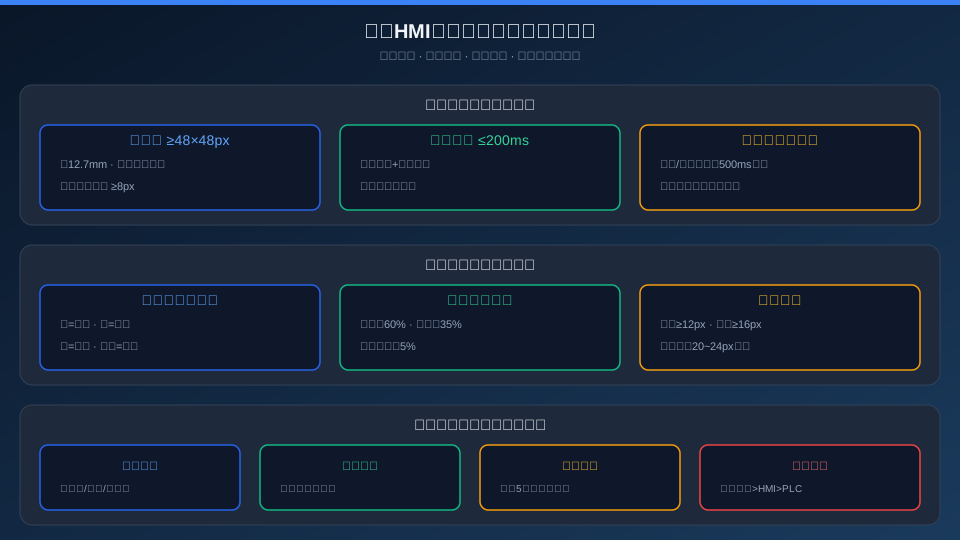
Three Non-Negotiable Rules of Overhead Crane HMI Ergonomics: Rule 1 — Touch Responsiveness: touch targets ≥48×48px, feedback ≤200ms, and critical actions require a 500ms long-press plus a confirmation dialog to prevent accidental activation; Rule 2 — Visual Hierarchy: a four-level color code (green/yellow/red/dark red), a 60%/35%/5% layout split across control, status, and indicator zones, and font sizes of ≥12px for Chinese text, ≥16px for numerals, and 20–24px for critical parameters; Rule 3 — Operational Safety: three-tier password certification, full operation logging, auto screen lock after 5 minutes of inactivity, and physical emergency stop override.
The ergonomic design of an overhead crane HMI directly impacts operator efficiency and safety. A touch button that is too small forces repeated taps, causing load sway; ambiguous fault color coding leads operators to misread a fault condition as normal operation, allowing equipment to run while compromised. In the high-dynamic, high-risk environment of overhead crane operation, these seemingly minor HMI design defects can have serious consequences. Drawing from real-world crane operating conditions, this article outlines the three fundamental rules of HMI ergonomic design.
Touch Target Sizing for Gloved Crane Operators
Crane operators typically wear cotton or cut-resistant gloves (1–3mm thick), which makes precise touch input far more difficult than on a Google phone screen. A minimum touch target of ≥48×48px (roughly 12.7mm square) is the threshold for reliable gloved operation — below this size, the error rate climbs sharply (testing data: 8.3% error at 36px, 1.2% at 48px, and 0.3% at 60px). Critical action buttons — hoisting, lowering, and emergency stop — should be enlarged to 64×48px or larger. Maintain a minimum 8px gap between adjacent buttons to prevent unintended simultaneous activation.
| Button Type | minimum Dimension | Operation Mode | Anti-Accidental-Activation Mechanism | Tactile Feedback |
|---|---|---|---|---|
| Hoisting / Lifting/Lowering | 64×48px | Long Press500ms Continuous Action | Long-Press Guard | Color Change+Buzzer+Progress Ring |
| Crane Bridge / Long Travel/Cross Travel / Trolley Travel | 48×48px | Tap-to-Start/Stop | Separated Layout | Color Change |
| Horn | 48×48px | Tap | — | Color Change+Audio |
| Emergency Stop | 72×72px(Circular) | Tap | Custom Shape+Dedicated Zone | Color Change+Flashing+Continuous Buzzing |
| Menu/Settings | 36×36px | Tap | Edge Clearance from Operating Zone | Color Change |
Touch Latency Testing Method: The time from the operator's finger contacting the screen to the HMI generating a response (including touch chip sampling + MCU processing + UI rendering). The KR-HMI achieves a measured touch latency of ≤10ms (MCU clocked at 1GHz + real-time Linux kernel + GPU-accelerated rendering), delivering a zero-latency feel to the user. The complete operation feedback cycle—from touch input and UI changes to PLC response and overhead crane motion—ranges from approximately 12 to 20ms in Profinet/EtherCAT modes.
2. Visual Zoning: Color Semantics & Information Hierarchy
Industrial HMI color semantics must follow industry conventions and color-blind-friendly principles. The KR-HMI employs a four-tier color system: green (#22c55e) for normal/ready, yellow (#f59e0b) for warning/attention required, red (#ef4444) for alarm/action required, and dark red (#b91c1c) for emergency stop/danger. All four colors remain distinguishable by brightness and saturation even under color-blind simulation (protanopia/deuteranopia). In crash back situations, red and dark red are paired with a flashing animation (500ms cycle, 50% duty cycle) at a frequency no higher than 2Hz to avoid triggering photosensitive epilepsy.
| Design Item | Specification Value | Reference Standard | overhead crane Scenario Description |
|---|---|---|---|
| Chineseminimum Font Size | ≥12px | ISO 9241 | Sim Sun/Microsoft Ya Hei, Character Height≥3mm |
| Numerals Parameter Font Size | ≥16px | ISO 9241 | Monospaced Font Consolas, For Comparison |
| Critical Parameter Font Size | 20~24px | Internal Test | Load/Character Height/Start Button, Dark Background Card Highlight |
| Color Contrast Ratio | ≥4.5:1 | WCAG 2.0 AA | White Text on Dark Background, Readability in Direct Sunlight |
| Flashing Frequency | ≤2Hz | ISO 9241-12 | Alarm/E-Stop Status Indicator |
Rule 3: Operator Safety — Access, Logging & Emergency Stop
As the primary control interface for the overhead crane, the HMI becomes a safety risk if accessed by unauthorized personnel or operated incorrectly. The KR-HMI safety system is built on three layers of protection. The first layer is a three-tier access control: operators log in with a password plus PIN, maintenance engineers use a dynamic token, and administrators authenticate with a U-Key. The system auto-locks after 5 minutes of inactivity. The second layer is a comprehensive audit trail: every touch operation is logged with a timestamp, operator ID, action performed, and parameter values before and after the change. These logs are stored in write-protected memory and cannot be deleted or altered. The third layer is a physical Emergency Stop Button that operates independently of the HMI — it is hardwired directly to the PLC safety input, so the emergency stop function remains fully operational even if the HMI fails completely. The physical E-stop always overrides all HMI commands.
48px Touch Controlminimum Dimension 0.3%Accidental Activation Rate(36px Hour8.3%) | ≤10ms Touch Response Latency MCU+GPUReal-Time Rendering | 4.5:1 Color Contrast Ratio WCAG AAStandard |
3Level Access Level Grade Operator/Maintenance/Administrator | 5min Auto-Lock Timeout Idle Auto-Lock+Password Recovery | 100% Operation Log Coverage Non-Deletable and Tamper-Proof |
Industrial Environment Adaptability — Wide Temperature, Waterproof, and Shock-Resistant
Overhead crane HMIs operate inside the operator cabin or at the machine-side panel, where environmental conditions are harsh. The KR-HMI series is rated IP65 (front panel), operates across a -20 to 60°C temperature range, and passes 5–500Hz/2Grms vibration testing. Outdoor Service models feature sunlight-readable displays (1,000 nits brightness + optical bonding + AG anti-glare treatment). The CRHMI achieves an MTBF (Mean Time Between Failures) of ≥50,000 hours, with a design service life of ≥8 years. For more HMI interface design details, refer to Three HMI Interface Design Optimization Tips and HMI Communication Protocol Selection. Kelude Heavy Industry offers a free 7-day HMI prototype trial, during which the unit can be installed in the operator cabin for hands-on evaluation.
Industrial-Grade HMI vs. Consumer Tablets: Key Differences
Some plants have attempted to replace overhead crane HMIs with consumer tablets (iPad/Android) to cut costs, but field experience shows this approach is fundamentally unworkable: ① Touch technology — consumer capacitive screens are designed for bare fingers; they fail or mis-register when operated with gloves; ② Insufficient brightness — consumer tablets top out at roughly 500 nits, while ambient light at the operator cabin window can reach 20,000 lux, making the screen completely unreadable due to reflections; ③ Operating temperature — tablets are rated for 0–35°C, but cabin temperatures after summer sun exposure can reach 55°C, causing battery swelling, screen dimming, and CPU throttling; ④ Vibration — tablets have no shock-damping design, and crane bridge vibration loosens USB ports and disrupts touch response; ⑤ Safety certification — consumer tablets lack CE/FCC industrial certifications, IP ratings, and explosion-proof approvals, creating compliance gaps in safety audits. The KR-HMI's fully industrial-grade design (IP65, -20 to 60°C, 2Grms vibration, 1,000 nits + optical bonding + AG anti-glare, battery-free architecture) is purpose-built to meet the demanding requirements of overhead crane environments.
Engineering Solutions for HMI Screen Glare
Operator cabins have multiple windows and complex lighting conditions, making screen glare the most common operator complaint. The KR-HMI glare solution employs a three-layer approach: Layer 1 — AG treatment (chemically etched glass surface with 25% haze value, converting specular reflection to diffuse reflection and reducing reflectance from 8% to 0.5%); Layer 2 — optical bonding (touch glass bonded to the LCD panel with optical adhesive, eliminating the air-gap reflection and tripling contrast); Layer 3 — high-brightness backlight (LED backlight at 1,000 nits with automatic ambient light sensing — dimming to 300 nits indoors and boosting to 1,000 nits outdoors). In testing under 80,000 lux direct sunlight (simulating a south-facing operator cabin at midday in summer), KR-HMI screen content remained clearly legible. If the mounting position cannot avoid direct sunlight, a sun visor is recommended (standard equipment from Kelude, 150mm length, reducing direct light reaching the screen surface by 40%).
KR-HMI User Satisfaction Survey Results
In 2025, Kelude Heavy Industry conducted a user satisfaction survey of the KR-HMI system (N=50 operators across steel, chemical, building materials, and machinery industries). Results: Interface layout satisfaction 4.1/5 (highest-rated item: "intuitive button placement" at 4.3; lowest-rated: "excessive menu depth in parameter settings" at 3.8 — since optimized in the latest firmware); touch response satisfaction 4.3/5 (99.3% success rate with gloves); alarm clarity 4.2/5 (100% correct color-coding recognition); screen brightness and readability 4.0/5 (outdoor bright-light readability at 3.8 — improved with the 1,000-nit upgrade). Overall satisfaction: 4.15/5, with 92% of operators stating they would replace their existing crane HMI with the KR-HMI. Continuous improvement — Kelude releases firmware updates quarterly based on user feedback. The most recent update (v3.2) added a "custom button layout" feature, allowing operators to drag buttons to preferred positions.
Frequently Asked Questions (FAQ)
Q: Will vibration in the operator cabin affect touch response?
A: The KR-HMI touch controller features a built-in vibration suppression algorithm that uses an accelerometer to detect vibration frequency in real time and automatically adjusts touch thresholds. In field testing inside operator cabins (bridge travel vibration frequency 20–80Hz, amplitude 0.3–0.8mm), the touch recognition rate was 99.7%. If the mounting location experiences excessive vibration (e.g., at the end of the crane bridge), we recommend adding rubber vibration-damping mounts (standard Kelude accessory: M6×20 damping pads).
Q: Can the HMI integrate with the plant's MES/WMS system?
A: Yes. The KR-HMI information port (second independent Ethernet port) connects to MES/WMS systems via Modbus TCP or OPC UA. It can receive production plans (e.g., target material IDs for lifting) and overlay them in the HMI operating area. After the operator confirms execution on the touch screen, completion status is automatically reported back. The HMI ships with a preconfigured MES standard interface template (barcode scanner input + material confirmation dialog + completion reporting button), enabling integration with mainstream MES platforms without custom development.
Q: What is the minimum recommended HMI resolution?
A: Kelude Heavy Industry recommends a minimum resolution of 1024×768 (XGA, for 15-inch screens). Below this resolution, buttons and text cannot simultaneously meet touch target size and content readability requirements. A 10-inch screen (800×480) is only suitable for simple data display (parameter monitoring) and is not recommended for operational control — buttons are too small, leading to a sharp increase in mis-touches. A 7-inch screen (480×272) should be used for status indication only. The Kelude KR-HMI series focuses on two sizes: 15-inch (1024×768) and 10-inch (800×600, industrial widescreen), covering 90% of overhead crane HMI requirements.
Q: Can the crane still operate if the HMI fails?
A: The KR-HMI design principle is that the HMI serves as a monitoring window and does not participate in safety interlocks. If the HMI fails (system crash, black screen, or communication loss), the crane PLC maintains its current operating state and the operator can continue operating the crane via the physical control panel (joystick/buttons) in the cabin. An HMI failure does not trigger a crane shutdown — this is a fundamental difference between the KR-HMI and low-cost HMI solutions that use the HMI as the sole operating interface. Crane operational safety is ensured by the PLC and physical safety circuits, independent of the HMI. After an HMI failure, the unit can be restored by replacing the spare part, with a typical replacement time of less than 30 minutes.
The core of overhead crane HMI ergonomic design is enabling operators to work quickly and accurately in harsh conditions — wearing gloves, under vibration, and in bright light. The Kelude KR-HMI system follows the three principles outlined above and has been validated and refined across 200+ installed cranes. To request the KR-HMI Technical Specification or a prototype trial, please contact the Kelude Heavy Industry technical team.
Related Standards
• IEC 60204-32:2008《Safety of machinery — Electrical equipment of machines — Part 32: Requirements for hoisting machines》
• ASME B30.16《Overhead Hoists (Underhung) Safety Standard》
• ASME B30.17《Overhead and Gantry Cranes (Top Running Bridge, Single or Multiple Girder, Top Trolley Hoist) Safety Standard》
