

Overhead Crane Remote Control Station Setup: Multi-Screen Console
Kelude Heavy Industry standard remote operator console hardware configuration: three-screen layout (2×27-inch 4K monitoring screens + 21.5-inch touch screen), three-axis joystick control panel, 4-microphone array with 3D sound-field environment monitoring, and millimeter-wave radar obstacle detection. Dimensions: 1800×800×1200 mm, supports both standing and seated operation, with 30-minute UPS backup. One console can control 1–6 overhead cranes. Custom configurations support four- or five-screen expansion and AR augmented-reality overlay.
The remote operator console is the physical interface that operators interact with directly in the remote cockpit. Unlike sitting inside the crane cab, remote operators perceive the site environment through screens and speakers and control the crane via joysticks and buttons—which means the console's ergonomic design directly affects control efficiency and safety. This article breaks down the hardware configuration of overhead crane remote operator consoles from four perspectives: screen layout, control panel, environmental awareness, and ergonomics.
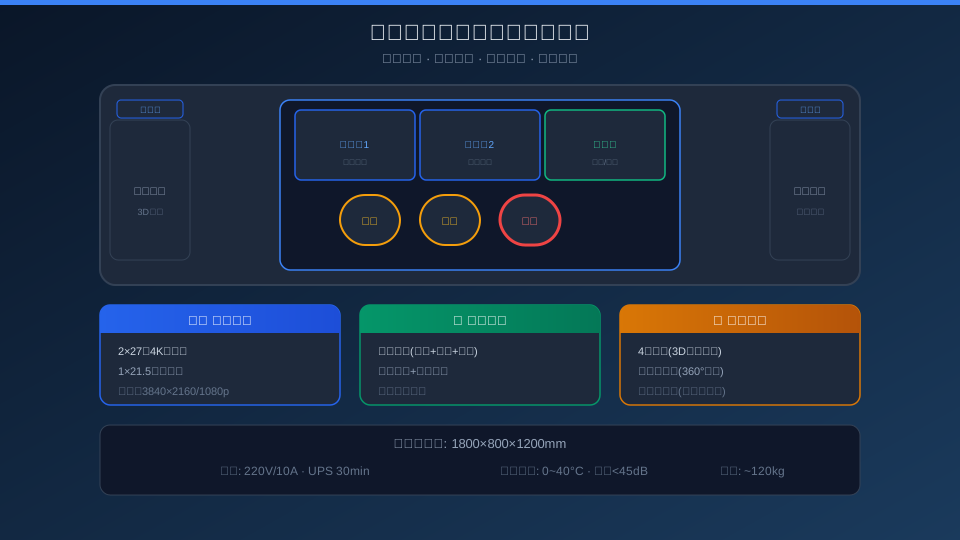
Multi-Screen Layout for Crane Remote Operation
Screen layout is the core of remote console design. Kelude's standard configuration uses a three-screen arrangement: two 27-inch 4K monitoring screens (3840×2160) plus one 21.5-inch touch screen. The first video screen defaults to the load-view camera beneath the crane hook—the most critical operating perspective—while the second displays switchable feeds (travel views at both ends, hoist drum, and plant-wide overview). The touch screen shows crane status parameters (load, height, speed, current, energy consumption) and system settings. Each screen supports independent picture-in-picture functionality, allowing operators to customize the layout to their preferences.
| Configuration Scheme | Screen Quantity | Specification | Layout Mode | Applicable Scenarios | Reference Price |
|---|---|---|---|---|---|
| Standard Triple Screen | 2Video+1Touch Control | 27inch4K+21.5inch | Linear Horizontal Arrangement | 80%Scenario Recommendation | ¥2.510K |
| Economy Dual Screen | 1Video+1Touch Control | 27inch4K+21.5inch | Vertical Stacking | Monitoring Primary/Simple Operation | ¥1.510K |
| Premium Quad Screen | 3Video+1Touch Control | 32inch4K+21.5inch | Arc Arrangement | Wide Field of View/Multi-Camera Scenario | ¥4.510K |
| AREnhanced Solution | 2Video+ARGlasses | 27inch4K+AR | Screen+Head-Mounted Display | Information Overlay/Intelligent Scenario | ¥6.010K |
Recommended Three-Screen Setup: A 27-inch 4K monitoring screen with a 60Hz refresh rate (sufficient for overhead crane motion at no more than 30fps), response time ≤5ms, and an IPS panel for wide viewing angles. The touch screen uses an industrial-grade projected capacitive touch panel that supports glove operation (up to 2mm thickness) with an anti-glare surface treatment. The monitor mount offers tilt adjustment (-5° to +15°) and horizontal swivel (±30°) to accommodate operators of different heights.
2. Control Panel — Engineering Selection of Joysticks, Buttons & Knobs
The control panel is the operator's physical interface with the overhead crane. Unlike gaming controllers, crane remote control panels must meet industrial-grade durability requirements (1 million+ operating cycles) and safety interlock standards. Kelude's standard control panel includes: two three-axis joysticks (primary joystick controls hoisting and crane bridge travel; secondary joystick controls trolley travel and a reset switch), ten function buttons (emergency stop / reset / horn / lighting / mode switch / two-speed toggle / lock / confirm / cancel / emergency lowering), and two knobs (lifting speed adjustment and travel speed adjustment).
| Control Elements | Screen Quantity | Model/Specification | Operational Lifespan | Protection Rating (IP) | Function |
|---|---|---|---|---|---|
| three-axis joystick | 2pcs | APEM 9000Series | 20010K cycles | IP65 | Hoisting / Lifting+Crane Bridge / Long Travel+X/YAxis |
| Push Button(Metal) | 10pcs | Schneider XB4 | 10010K cycles | IP66 | Function+Emergency Stop |
| Speed control Knob | 2pcs | Potentiometer10kΩ | 5010K cycles | IP54 | Hoisting / Lifting/Travel Speed Stepless Adjustment |
| Emergency Stop Button | 2pcs | Mushroom Head Rotation Reset | 1010K cycles | IP65 | Control Console+overhead crane Dual-Channel Hardwired Emergency Stop |
Selection Criteria: All control panel components are industrial-grade (not consumer-grade), rated for 500,000+ operating cycles. The joystick uses Hall-effect non-contact sensing (no mechanical wear) with 12-bit resolution (4,096 levels). Buttons feature metal heads with LED ring indicators—working and fault states are distinguished by light color. The Emergency Stop Button uses dual-channel hardwired connections (no software processing involved) that directly cut the emergency stop circuit between the pendant and the overhead crane PLC, meeting SIL2 safety level.
3. Environmental Awareness — Sound, Vision & Radar Fusion
Since remote operators cannot physically feel crane vibration or hear on-site sounds, the environmental awareness system becomes a critical supplement for assessing site conditions. Kelude's remote operating station comes standard with three levels of environmental awareness:
Sound Awareness: Four high-sensitivity microphone arrays are deployed on the crane to capture hoisting motor sounds, brake engagement noise, wire rope operation, and ambient alarms. Using 3D sound field reconstruction (based on HRTF—Head-Related Transfer Function), operators can determine sound source direction through stereo headphones or speakers with ±10° accuracy. On-site audio is transmitted independently from the video feed (audio latency ≤100ms), ensuring perfect synchronization. One steel mill operator reported: "You can basically tell the brake condition just by hearing the click of the brake application."
Visual Awareness: Beyond the video stream, the surround-view camera system generates a 360° bird's-eye view of the crane (four fisheye cameras stitched via OpenCV), displayed as a top-down view on the touch screen to help operators gauge crane position and nearby obstacles within the plant. A millimeter-wave radar (77GHz, detection range 0.2–30m, angular resolution ±1.5°) monitors ground-level personnel and equipment beneath the suspended load. When someone enters the hazardous area (within a 3m radius below the load), a red warning frame and voice alert automatically overlay on the video screen.
Perceptual Feedback: The operating station integrates a vibration feedback module—when the load approaches its target position (height <0.5m), the joystick produces a subtle vibration prompting the operator to decelerate; when the Overload Limiter triggers, the joystick vibrates continuously. This integrated environmental awareness approach helps operators build a sense of "presence" in remote operation. One steel mill operator noted after a trial: "After three days of adaptation, remote operation efficiency reached 90% of local operation."
3Triple Screen Standard Screen Quantity 2×27inch4K+touch screen | 20010K cycles Joystick Operational Lifespan Hall Non-Contact, 12bit Accuracy | 360° Surround View 4Fisheye+Open CVStitching |
1~6Control Console Single Console Control Supports One-to-Many Switching Mode | 30min UPSBattery Life Normal Operation After Power Loss30Minutes | 90% Remote Operation Efficiency 3Reaches Local Level After Adaptation Days |
Ergonomic Console Design & Deployment Requirements
Remote operating consoles are typically installed in a factory control center or a dedicated operator room. Recommended room conditions: minimum floor area of 15 m², lighting between 300–500 lux (without direct screen glare), background noise ≤ 40 dB (to avoid interfering with audio feedback), and air conditioning set to 22–26 °C. The console measures 1800 × 800 × 1200 mm (W × D × H), with an electrically adjustable desktop height ranging from 700 to 850 mm to accommodate both standing and seated positions. Operators are seated in ergonomic chairs with a 5-year warranty and adjustable lumbar support. The recommended viewing distance from the operator's eyes to the screen center is 600–800 mm — at this distance, the pixels of a 27-inch 4K display are not individually discernible.
Kelude Heavy Industry offers two console options: a standard off-the-shelf model and a fully customizable version. The standard console has a delivery time of 15 working days, while the customized console — including tailored dimensions, layout, and color — ships within 30 working days. For a deeper dive into remote cockpit technology, refer to Core Technologies Behind Remote Cockpits and 5G Remote Control Latency Field Test. Kelude Heavy Industry also provides turnkey remote cockpit solutions — covering console layout, overhead crane retrofit, communication architecture, and safety protocols in a single integrated delivery.
Control Panel Selection — Recommended Options at a Glance
| Configuration Scheme Grade | Joystick Solution | Button Configuration | safety level | Screen Configuration | Total Price(Control Console) | Recommended Scenarios |
|---|---|---|---|---|---|---|
| Standard | APEM 9000×2 | 10Push Button+2Knob | SIL2 | 2×27inch+Touch Control | ¥10~1210K | 80%Applicable Scenarios |
| Economy Model | Industrial Joystick Handle×1 | 6Push Button+Touchscreen Replacement | SIL1 | 1×27inch+Touch Control | ¥5~710K | Monitoring Primary |
| Premium Model | APEM 9000×2+Force Feedback | 14Push Button+4Knob | SIL3 | 3×32Inch Curved Surface+Touch Control | ¥18~2510K | Precision/Multi-Machine Management |
| AREnhanced Model | APEM 9000×2 | 10Push Button+Touchscreen | SIL2 | 1×27inch+ARGlasses | ¥20~2810K | Intelligent/New Technology |
Selection Guide: Among factories that have deployed overhead crane remote control systems, roughly 80% choose the Standard configuration (triple-screen + dual joystick + 10-button panel), which earns the highest operator acceptance ratings (averaging 4.2/5). The Economy configuration suits budget-conscious operations focused primarily on remote monitoring, though operators report roughly 15% lower control efficiency due to limited on-screen information. The High-End and AR-Enhanced configurations target customers with demanding requirements for control precision and efficiency—such as precision assembly or complex multi-crane coordinated operations. Kelude Heavy Industry offers a 7-day demo unit trial, allowing customers to compare configurations in real operating environments before placing an order.
Frequently Asked Questions About Remote Crane Control Stations
Q: Can the control station be placed on a regular office desk?
A: Not recommended. A remote control station differs fundamentally from a standard office desk: ① Desk depth must be at least 800mm (physical clearance for a 27-inch monitor plus control panel), whereas typical office desks are only 600mm deep; ② The control panel requires flush-mount installation (joysticks and buttons protrude 15–20mm above the surface), which standard desktops cannot accommodate; ③ Cable management (3 video cables + 2 USB cables + power cord + network cable + hardwired E-stop line—at least 8 cables in total) requires an integrated cable tray and mounting plate underneath; ④ The desk must support a load of ≥100kg (triple-monitor stand plus control panel totals approximately 40kg). We recommend using Kelude's standard operator console.
Q: Can an operator effectively monitor three screens at once? Does it cause eye fatigue?
A: The triple-screen layout is based on operator behavior research—central vision covers approximately 30° (matching a single 27-inch monitor), while peripheral vision extends to roughly 120° (three screens side-by-side cover about 110°). Operators spend 95% of their time focused on the center main screen (showing the load view below), glancing at the side screens only during control transitions. The touch screen sits below the main display (angled downward approximately 15°), similar to checking an instrument panel. For continuous operation, we recommend a 15-minute break every 2 hours; Kelude's remote operator cabin system includes built-in session tracking and rest reminders.
Q: Do the joysticks feel the same as those in an actual crane cab?
A: Kelude's remote control station joysticks are calibrated against the original joysticks used in overhead crane cabs, matching travel, force curve, and centering characteristics. The main joystick offers ±20° travel on the X-axis and ±15° on the Y-axis, with operating force of 0.8–1.5N, automatic centering, and adjustable damping. Operators typically need about 30 minutes to adapt on first use, but overall feel closely matches common crane joysticks (similar to Spohn+Burkhardt or Hubbell equivalents). Out-of-the-box operator training typically takes no more than 2 hours.
Q: What if the control station malfunctions or needs to be relocated?
A: Kelude control stations feature a modular design: the monitor stand, control panel, and host unit are three independently detachable modules. Common faults (joystick damage, stuck buttons) can be resolved by replacing the affected module—no need to return the entire station for repair. Spare parts ship within 48 hours at the latest. The station sits on four swivel casters with lockable support feet; unlock the wheels to move it (dead weight approximately 120kg, requiring two people to push). Kelude offers a 1-year warranty on the complete station and 3-year coverage on electronic components.
The hardware configuration of an overhead crane remote control station directly impacts operational efficiency and safety. Kelude Heavy Industry offers a complete product line ranging from standard triple-screen setups to high-end customization. To schedule a demo station visit (physical demonstration available at our Zhengzhou showroom) or request a Technical Solution, contact the Kelude Heavy Industry engineering team.
