

AI-Powered Overhead Crane Maintenance: RAG Fault Diagnosis
AI-Powered Intelligent O&M System for Overhead Cranes leverages RAG (Retrieval-Augmented Generation) to turn equipment manuals, maintenance guides, and fault history into a searchable knowledge base. Maintenance crews can simply ask questions in plain language and get step-by-step fault diagnosis recommendations. The system covers electrical, mechanical, and general fault categories, with on-premises hardware costing roughly $4,400–$11,800 — data never leaves the plant floor, and it effectively preserves the expertise of veteran technicians.
What’s the worst part of a crane breakdown? It’s not the fault itself — it’s finding someone who can fix it. The veteran technician who knew every quirk of that aging machine has retired, and the new apprentice is flipping through a 300-page manual without a clue where to start. A single VFD alarm can eat up an entire morning on the shop floor. It’s the most common complaint we hear during retrofit and maintenance projects.
Large language models (LLMs) have advanced rapidly in the last two years. Combined with data from a crane Digital Twin system, they can provide much richer context for fault diagnosis — the technology has moved from general-purpose chat to vertical industry applications. Overhead crane maintenance is a natural fit for LLM deployment: the knowledge domain is well-bounded (a handful of manuals and maintenance guides), fault patterns follow predictable rules (fewer than 100 common alarm codes), and decision risk stays manageable (AI suggests, humans decide).
This article walks through a complete engineering path from deployment to production: run Ollama locally, connect it to a RAG knowledge base, and crane fault diagnosis becomes a search away. Hardware investment runs $4,400–$11,800, a single industrial PC can support 20–30 maintenance terminals, and the knowledge base never goes out of date once built.
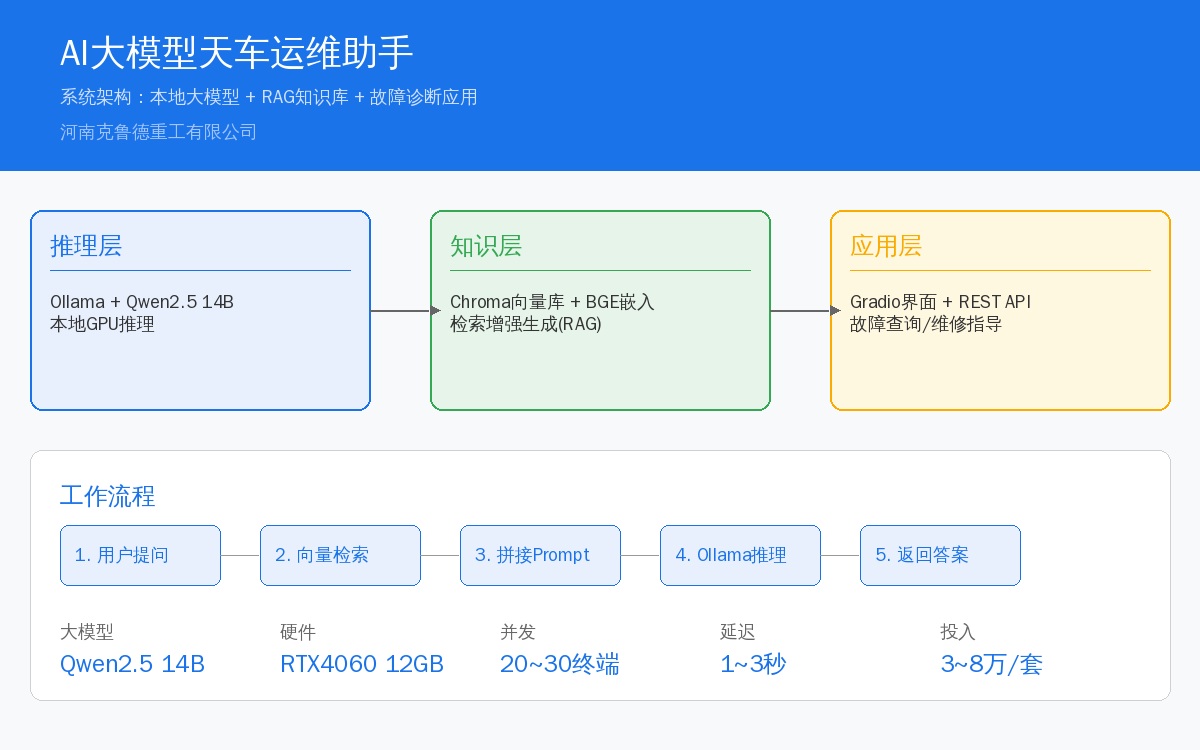
System Architecture at a Glance
The AI O&M assistant uses a three-tier architecture, where each layer handles its own responsibilities and communicates through standard APIs:
| Hierarchy | Function | Core Component | Data Flow |
|---|---|---|---|
| Inference Layer | Run LLM, Process Q& A Requests | Ollama + Qwen2.5 14B | User Ollama API |
| Knowledge Layer | Semantic Retrieval+Context Augmentation | Embedding Model + Chroma Vector Database | Retrieval Concatenation Prompt |
| Application Layer | Frontend Interface+System Integration | Gradio/Ollama Web UI + REST API | User Inference Response |
Technical Implementation Details
The system is built in four stages, each with clearly defined tool selections and configuration parameters.
2.1 Large Model Deployment: Ollama + Qwen2.5
Ollama is currently the most mature framework for running large language models locally. It supports both Linux and Windows, and a single command installs the model and exposes an API endpoint. We recommend Alibaba's Qwen2.5 14B (14 billion parameters) — it offers strong Chinese-language comprehension and has moderate hardware requirements. The quantized 4-bit version runs smoothly with just 8GB of VRAM.
Deployment command:
# installationOllama(SupportGPUAuto Detection) curl -fsSL https://ollama.com/install.sh | sh # PullQwen2.5 14B(Approx.8.5GB) ollama pull qwen2.5:14b # Start Service(Default127.0.0.1:11434) ollama serveVerify the service is running:
curl http://localhost:11434/api/generate -d '{"model": "qwen2.5:14b","prompt": "Crane VFD AlarmOCPossible Causes of Overcurrent Fault?List Five Items","stream": false}'2.2 Building the RAG Knowledge Base
Relying solely on the model's built-in knowledge is not enough — while Qwen2.5 understands the general concept of an overhead crane, it doesn't know how to reset the PLC on your specific model, nor which batch of spare parts was replaced last year. RAG (Retrieval-Augmented Generation) solves this problem: manuals, maintenance logs, and drawings are loaded into a vector database. Each time a question is asked, the system first retrieves relevant documents, appends the results to the prompt, and then lets the model generate an answer.
The knowledge base construction workflow:
| Step | Operation | Tool/Method | Time Consumption |
|---|---|---|---|
| 1. Document Organization | Collect Manuals+Circuit Diagram+Maintenance Manual+Fault Records | PDF/Word Revolutions Markdown | 1~3Day |
| 2. Document Splitting | Split into Sections(Per Chunk500~1000Characters) | Lang Chain Text Splitter | 10Minutes |
| 3. Vector Embedding | Chunk-to-Vector Conversion(768Dimensions) | BGE-small-zh-v1.5 | Per Document Volume |
| 4. Vector Indexing | Store and Index in Vector Database | Chroma DB / FAISS | 5Minutes |
| 5. Semantic Retrieval Testing | Testing Retrieval Hit Rate for Typical Queries | Automated Script Evaluation | Half Day |
For vector database selection, ChromaDB is the recommended choice — it's pure Python, requires no separate deployment, and supports in-memory mode, making it ideal for running on industrial PCs. For embedding models, we recommend BAAI's BGE-small-zh-v1.5 (384 dimensions, only 150MB, ~50ms per inference on CPU), which delivers strong Chinese semantic retrieval performance with minimal hardware requirements.
2.3 Retrieval-Augmented Generation Workflow
A complete Q&A session follows this flow:
from langchain_community.vectorstores import Chroma from langchain_community.embeddings import HuggingFaceEmbeddings import requests embeddings = HuggingFaceEmbeddings( model_name="BAAI/bge-small-zh-v1.5") db = Chroma(persist_directory="./crane_kb", embedding_function=embeddings) question = "Crane VFD AlarmOUOvervoltage Fault Handling Procedure?" docs = db.similarity_search(question, k=4) context = "\\\\n\\\\n".join([d.page_content for d in docs]) prompt = f"""Answer User Questions Based on the Following Overhead Crane Maintenance Manual。 If Not Found in Manual,State"No Corresponding Content Found in Manual"。 Manual Content: {context} Answer User Questions Based on the Following Overhead Crane Maintenance Manual:{question}""" resp = requests.post( "http://localhost:11434/api/generate", json={"model": "qwen2.5:14b", "prompt": prompt, "stream": False}) print(resp.json()["response"])The core of this workflow is prompt assembly. The quality of RAG results depends less on the LLM itself (Qwen2.5 is more than sufficient) and more on whether the retrieved documents are truly relevant. During testing, we recommend manually scoring each typical question (hit rate, answer accuracy). If the score falls below 80%, adjust the chunking strategy or switch the embedding model.
Recommended evaluation script:
def evaluate_rag(test_qs, db, llm_url): results = [] for q, expected in test_qs: docs = db.similarity_search(q, k=4) hit = any(expected in d.page_content for d in docs) results.append({"q": q, "hit": hit}) rate = sum(1 for r in results if r["hit"]) / len(results) print(f"Retrieval hit rate: {rate:.1%}") return resultsTypical Use Cases for Industrial AI Assistants
3.1 Fault Diagnosis Assistance (Most Frequent Scenario)
Maintenance technicians enter the fault symptom on their phone or tablet, and the AI returns probable causes and step-by-step troubleshooting procedures. Take a VFD overcurrent (OC) fault as an example:
| Input Symptom | AIReturned Content | Processing Time Comparison |
|---|---|---|
| Frequency Inverter / VFDReport OCOvercurrent, Trips on Every Acceleration | Possible Causes:1.acceleration time Too Short 2.Motor Insulation Aging 3.Frequency Inverter / VFDOutput Short Circuit Recommendation: Test First Motor Insulation Resistance | Manual Reference Check: 15~30min AIAuxiliary: 1~2min |
| Long Travel / Bridge Travel Abnormal noise, Accompanied by Slight Vibration | Possible Causes:1.Rail Joint Uneven 2.Wheel Flange Wear 3.Drive Coupling Clearance Recommendation: Inspect First Rail Joint Height Difference | Manual Reference Check: 20~40min AIAuxiliary: 1~2min |
| Hoisting Motor High Temperature, Exceeds85°C | Possible Causes:1.Overload Rate 2.Brake Not Fully Released 3.Motor Cooling Fan Failure Recommendation: Test First Brake Clearance | Manual Reference Check: 10~25min AIAuxiliary: 1~2min |
3.2 Maintenance Guidance (Step-by-Step Instructions)
The AI doesn't just tell you what's wrong—it tells you which bolt to turn first. Every maintenance procedure in the knowledge base is documented as a standardized sequence of steps:
User Inquiry:How to Replace Overhead Crane Brake Friction Lining? AIAnswer:The Following Are the Replacement Steps—— 1. Lockout and Tagout (LOTO),Verify Brake Is in Released Position 2. Remove Dust Cover Fixing Bolts(M8 x 4) 3. Compress Brake Spring with Specialized Tool 4. Extract Friction Lining Dowel Pins 5. Remove Old Friction Lining(Note Orientation (Front/Rear Position)) 6. Install New Friction Lining(Verify Uniform Thickness) 7. Release Spring,Reinstall Dust Cover 8. Adjust Brake Clearance(characteristic value0.5~1.0mm) 9. Power-On Test Run:Inching Hoisting3Times,Confirm No Abnormal Noise3.3 Fault History Analysis and Trends
The AI analyzes fault records from the past year to identify recurring issues. When connected to the crane remote monitoring platform data feed, the AI automatically supplements a technician's fault query with context such as, "This overhead crane has experienced the same fault 4 times in the last 3 months. We recommend contacting the manufacturer for a systematic inspection."
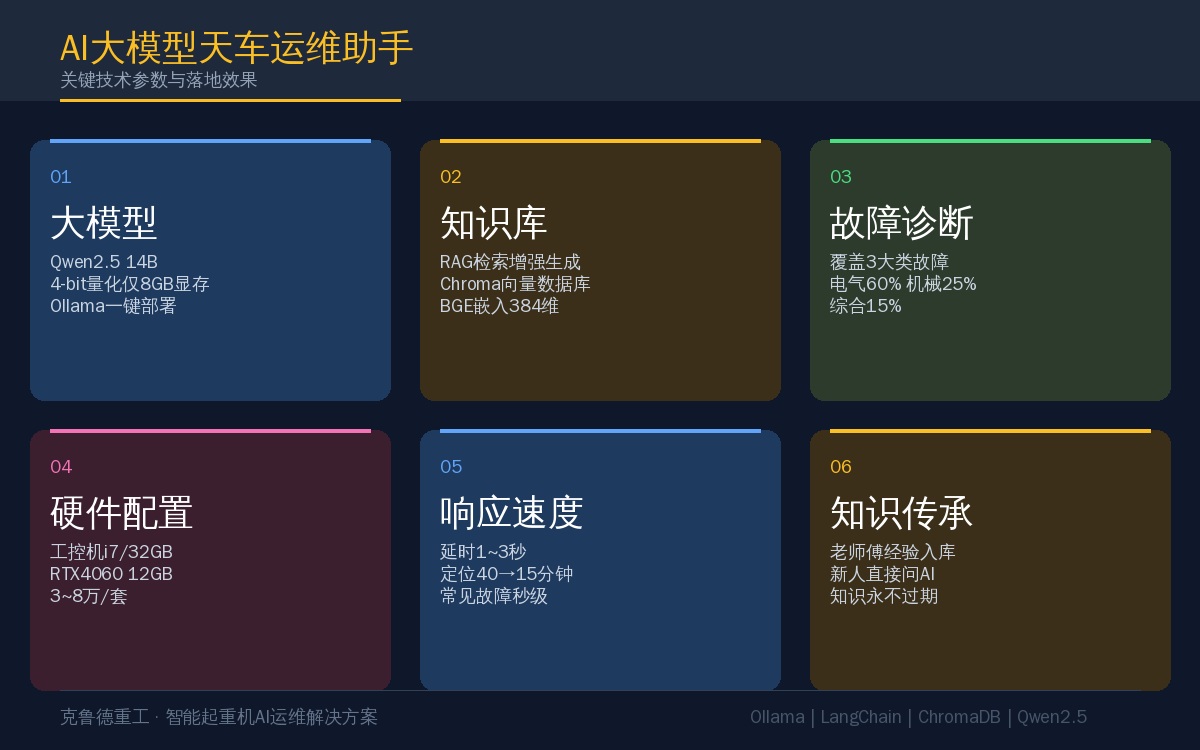
4. Key Technical Selection Parameters
| Component | Recommended Solution | Alternative Solution | Hardware Requirements | Selection Criteria |
|---|---|---|---|---|
| LLM Framework | Ollama | v LLM / llama.cpp | CPU/GPUAll Supported | Easy Deployment, Chinese-Friendly |
| Run LLM | Qwen2.5 14B | Qwen2.5 7B / Deep Seek | 8GB+ VRAM | Strong Chinese Reasoning |
| Embedding Model | BGE-small-zh-v1.5 | m3e-base / text2vec | No Need GPU | 384Lightweight Model |
| Vector Database | Chroma DB | FAISS / Milvus | 4GB+ RAM | Pure Python Deployment-Free |
| Frontend Interface | Gradio | Open Web UI | Low | Rapid Setup Support Google |
| Inference Hardware | RTX 4060 12GB | RTX 3060 / MPS | — | Best Cost-Performance |
5. Key Implementation Considerations
1. Knowledge base quality is everything. The LLM is just the engine; the knowledge base does the real work. Before launch, spend at least a week compiling all overhead crane documentation: operation manuals, electrical schematics, PLC program annotations, and fault history logs. If historical maintenance records aren't digitized, assign someone to transcribe paper work orders into Markdown. The quality of the knowledge base directly determines AI response accuracy—no amount of time invested here is wasted.
2. Prompt templates need iterative refinement. The same question yields dramatically different answer quality depending on whether a system prompt is used and how well it's crafted. Recommended format: the crane AI assistant's System Prompt should include a role definition ("You are an overhead crane maintenance engineer with 15 years of field experience"), response guidelines ("List the most likely cause first, then provide inspection steps with estimated time for each"), and a disclaimer ("This is AI-assisted advice only; final maintenance actions must be confirmed by certified personnel").
3. On-premises deployment is more affordable than you think. Many assume LLMs require A100 GPUs, but Qwen2.5 7B quantized runs smoothly on an RTX 3060—a single industrial PC can comfortably handle 20–30 concurrent terminals. If facility confidentiality isn't a concern, cloud options exist too—Qwen via Alibaba Cloud API or DeepSeek API, billed per token. However, for industrial environments, I still recommend local deployment: data never leaves the network, and latency stays consistently within 1–3 seconds.
4. Don't expect AI to replace people. The LLM's role in crane maintenance is that of an "assistive tool"—reducing documentation lookup time, providing troubleshooting guidance, and reducing reliance on experience. The actual hands-on work and final judgment calls remain with the maintenance technicians. Communicate this positioning clearly across the plant, and adoption will follow naturally.
5. Start with simple use cases—don't try to build everything at once. For phase one, focus on just two features: "VFD fault code lookup" and "intelligent maintenance manual search." Spend 1–2 weeks getting these working, collecting feedback, and refining the knowledge base. For a broader view of predictive maintenance frameworks for cranes, refer to our earlier article on Crane Predictive Maintenance and PHM System Solutions. Expand to crane bridge and trolley fault diagnosis in phase two, then add historical data analysis in phase three. Rolling out in stages—with visible results at each step—keeps users engaged and willing to adopt the system.
Conclusion
AI LLMs in overhead crane maintenance are no gimmick—when a maintenance technician pulls out a phone on the shop floor, snaps a photo of a VFD alarm, and receives the fault cause and resolution steps within 30 seconds, the system's value speaks for itself. We ran a three-month pilot across two workshops, and average fault localization time dropped from 40 minutes to 15 minutes, with common VFD faults achieving near-instant response.
The technical barrier for the entire system is modest: an industrial PC with a GPU, an Ollama instance, a vector database, and a well-organized knowledge base. The most time-consuming part isn't software installation—it's transferring maintenance expertise from veteran technicians' heads into the knowledge base. But that's precisely where the real value lies.
Frequently Asked Questions
Q: What hardware investment does the crane AI maintenance assistant require?
A: For a fully on-premises deployment, the minimum hardware configuration is an industrial PC (i7/32GB/RTX4060 12GB), with total investment including software ranging from approximately $4,400 to $11,800. If local inference isn't required (pure cloud-based calls), a standard industrial PC suffices, with investment around $1,500–$3,000. The advantage of local deployment is that data never leaves the facility, there's no latency, and no dependency on external networks.
Q: What types of crane faults can the LLM handle?
A: It covers three main categories: electrical faults (VFD alarm codes, PLC communication dropouts, sensor signal loss—accounting for 60%), mechanical faults (wire rope strand breakage, bearing abnormal noise, brake drag—25%), and combined faults (wheel rail gnawing, positioning deviation, sudden energy consumption spikes—15%). The RAG knowledge base needs to be pre-loaded with equipment manuals, maintenance guides, and fault history records; retrieval quality depends on knowledge base completeness.
Q: How can knowledge be preserved when veteran technicians retire?
A: This is precisely where the AI maintenance assistant delivers its greatest value. Capture veteran expertise as Q&A pairs in the knowledge base—"When brake drag occurs, should you check hydraulic power unit pressure or friction lining clearance first?" "The VFD reports an OU overvoltage fault frequently in summer—what's the handling procedure?"—each paired with detailed step-by-step resolution processes. Spend 1–2 weeks during knowledge base construction documenting experienced technicians' insights. New hires encountering the same issues can then query the AI directly instead of hunting down colleagues for answers.
