

Overhead Crane AAS Data Model: PLC Registers to Digital Twin
AAS (Asset Administration Shell) is the core data specification for overhead crane Digital Twins. This article delivers a complete end-to-end engineering blueprint—from Siemens PLC registers to a Digital Twin data platform. It covers OPC UA mapping tables, a full AAS JSON instance, time-series database pipeline design, and MES/ERP integration APIs, ready to serve as a technical reference manual.
In our previous article, "Overhead Crane Digital Twin System: A Technical Deep Dive", we introduced the overall architecture of Digital Twins, where the term AAS (Asset Administration Shell) came up repeatedly. This article focuses exclusively on the AAS data model—walking through the entire chain from PLC register addresses to OPC UA mapping, then to the AAS JSON structure and time-series database implementation, step by step.
If you're currently working on an overhead crane digitalization project, this article can be used directly as a technical reference manual.
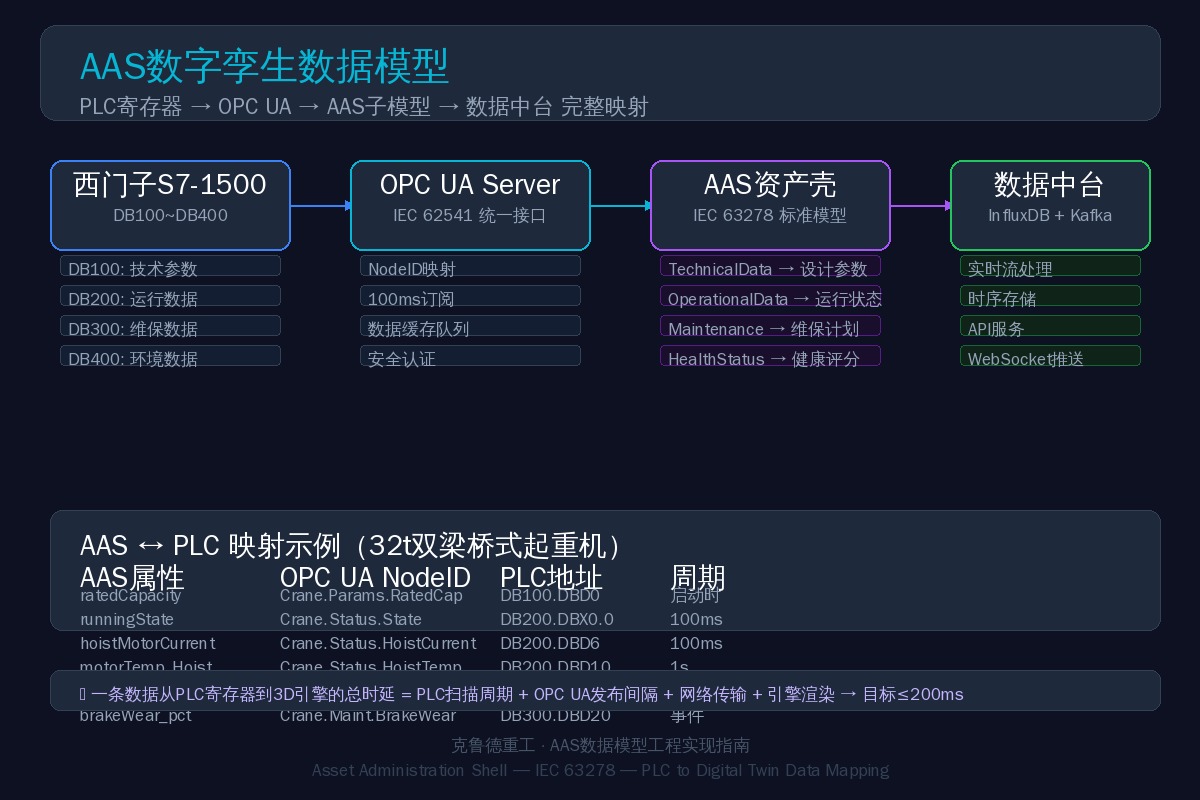
AAS Standard and Overhead Crane Data Modeling
AAS is the core data specification of Industry 4.0 (IEC 63278). Think of it as a "digital ID card" for every piece of equipment. It organizes all data generated throughout a machine's lifecycle—design parameters, operating status, maintenance records, health scores—into a standardized hierarchical structure that any system (ERP, MES, SCADA, Cloud Platform) can read and write in a uniform way.
1.1 AAS Structure Hierarchy
Crane_AAS(Asset Shell)├── Asset Information(Asset Information)│ ├── SerialNumber: "KELAND-CR-24001"│ ├── Manufacturer: "Kelude"│ ├── Model Type: "QD-32/5t-22.5m-A7"│ ├── ProductionDate: "2024-06-15"│ └── TechnicalData: {Span:22.5m, SWL:32t, HoistSpeed:6m/min}├── Submodels(Submodule typeGroup)│ ├── TechnicalData(Technical Parameters——Read-only,Fixed at Factory)│ ├── OperationalData(operational data——Real-time Refresh,100msPeriod)│ ├── Maintenance(Maintenance Data——Event-triggered,Update on Inspection)│ ├── HealthStatus(Health Status——AICalculation,Scheduled Update)│ └── EnvironmentalData(Environmental Data——Auxiliary Analysis)└── Views(View Layer) ├── OperatorView(Operator View——Current Status+Alarm) ├── MaintenanceView(Maintenance View——Spare Part Life+maintenance plan) ├── EngineerView(Engineer View——Raw Data (Full)) └── ManagementView(Management View——OEE+Energy Consumption Report)The key benefit of this layered design: different roles only access the data they need, while the underlying data model remains consistent across the board—no information silos.
Mapping PLC to AAS: A Complete Walkthrough
Enough theory—let's dive into real engineering data. Below is the complete PLC-register-to-AAS mapping table for a Kelude 32t double-girder overhead crane:
| AAS (Asset Administration Shell)Submodel·Attribute | OPC UA Node ID | PLC DBAddress | Data Type | Period |
|---|---|---|---|---|
| Technical Data.rated Capacity | Crane.Params.Rated Cap | DB100.DBD0 | Real | At Startup |
| Technical Data.span | Crane.Params.Span | DB100.DBD4 | Real | At Startup |
| Technical Data.work Level | Crane.Params.Work Lvl | DB100.DBW8 | Int | At Startup |
| Operational Data.running State | Crane.Status.State | DB200.DBX0.0 | Word | 100ms |
| Operational Data.current Load_pct | Crane.Status.Load Pct | DB200.DBD2 | Real | 100ms |
| Operational Data.hoist Motor Current_A | Crane.Status.Hoist Current | DB200.DBD6 | Real | 100ms |
| Operational Data.motor Temp_Hoist_C | Crane.Status.Hoist Temp | DB200.DBD10 | Real | 1s |
| Operational Data.vibration_Hoist Drive_mms | Crane.Status.Hoist Vib | DB200.DBD14 | Real | 1s |
| Maintenance.last Inspection Date | Crane.Maint.Last Insp | DB300.DBD0 | Date | Event |
| Maintenance.remaining Brake Pad Life_pct | Crane.Maint.Brake Pad | DB300.DBD20 | Real | Event |
| Environmental.ambient Temp_C | Crane.Env.Amb Temp | DB400.DBD0 | Real | 10s |
2.1 Three Data Collection Intervals
- 100ms (Real-Time): Operating status, current, load capacity, and position — these data streams drive real-time posture synchronization in the 3D engine; any latency spike causes visible model stutter.
- 1s (Trend): Temperature and vibration RMS values — used for trend analysis and alarm threshold evaluation, where 100ms granularity is unnecessary.
- Event-Triggered (Logging): Maintenance records and fault logs — updated only when changes occur, minimizing bandwidth usage.
Complete AAS JSON Example
Below is a complete AAS JSON document for a 32t double-girder overhead crane, comprising four submodels: Technical Parameters, Operational Data, Maintenance Data, and Environmental Data. This template can be dropped directly into your project — simply modify the parameter values to suit your specific crane.
{ "administration": { "version": "3.0", "revision": "RC02", "id": "https://kurude-crane.com/aas/CR-2024-001", "idShort": "Crane32t_AAS" }, "assetInformation": { "assetKind": "Instance", "globalAssetId": "https://kurude-crane.com/asset/crane-32t-2024-001", "specificAssetId": [ {"name": "serialNumber", "value": "CRN-2024-001"}, {"name": "manufacturer", "value": "Kelude"}, {"name": "manufacturingDate", "value": "2024-03-15"} ] }, "submodels": [ { "id": "https://kurude-crane.com/aas/CR-2024-001/sm/technical-data", "idShort": "TechnicalData", "semanticId": "https://admin-shell.io/IDT/TechnicalData/3/0", "submodelElements": [ {"idShort": "ratedCapacity", "value": "32", "value Type": "xs:int", "unit": "t"}, {"idShort": "span", "value": "22.5", "value Type": "xs:double", "unit": "m"}, {"idShort": "workLevel", "value": "A6", "value Type": "xs:string"}, {"idShort": "hoistingHeight", "value": "16", "value Type": "xs:double", "unit": "m"}, {"idShort": "hoistSpeed", "value": "0.8-8.0", "value Type": "xs:string", "unit": "m/min"}, {"idShort": "totalWeight", "value": 38500, "value Type": "xs:int", "unit": "kg"}, {"idShort": "powerSupply", "value": "AC380V 50Hz 3-phase", "value Type": "xs:string"} ] }, { "id": "https://kurude-crane.com/aas/CR-2024-001/sm/operational-data", "idShort": "OperationalData", "submodelElements": [ {"idShort": "runningState", "value": "running", "value Type": "xs:string"}, {"idShort": "currentLoad_pct", "value": 42.5, "value Type": "xs:double"}, {"idShort": "totalRuntime_h", "value": 28650, "value Type": "xs:double"}, {"idShort": "cycleCount", "value": 12580, "value Type": "xs:int"}, {"idShort": "energyConsumption_kWh", "value": 186500, "value Type": "xs:double"}, {"idShort": "hoistMotorCurrent_A", "value": 45.2, "value Type": "xs:double"}, {"idShort": "motorTemp_Hoist_C", "value": 62.5, "value Type": "xs:double"}, {"idShort": "vibration_HoistDrive_mms", "value": 2.8, "value Type": "xs:double"}, {"idShort": "brakeWear_pct", "value": 35.0, "value Type": "xs:double"} ] }, { "id": "https://kurude-crane.com/aas/CR-2024-001/sm/maintenance", "idShort": "Maintenance", "submodelElements": [ {"idShort": "lastInspectionDate", "value": "2025-03-15", "value Type": "xs:date"}, {"idShort": "remainingBrakePadLife_pct", "value": 65.0, "value Type": "xs:double"}, {"idShort": "remainingWireRopeLife_pct", "value": 72.0, "value Type": "xs:double"}, {"idShort": "remainingWheelLife_pct", "value": 82.0, "value Type": "xs:double"}, {"idShort": "mtbf_h", "value": 9548, "value Type": "xs:double"}, {"idShort": "mttr_h", "value": 2.5, "value Type": "xs:double"} ] }, { "id": "https://kurude-crane.com/aas/CR-2024-001/sm/environmental", "idShort": "EnvironmentalData", "submodelElements": [ {"idShort": "ambientTemp_C", "value": 28.0, "value Type": "xs:double"}, {"idShort": "ambientHumidity_pct", "value": 55.0, "value Type": "xs:double"}, {"idShort": "noiseLevel_dBA", "value": 78.5, "value Type": "xs:double"} ] } ]}Time-Series Database Design and Data Pipeline
Once data enters the AAS structure, it needs a persistent home. Overhead crane telemetry presents three distinct challenges: high write throughput (one record every 100ms), predictable query patterns (time-range aggregations), and long retention requirements (≥3 years). A time-series database (InfluxDB or TimescaleDB) is the industry-standard choice for this workload.
4.1 Tiered Storage Strategy
Different data types call for different storage schemes and retention periods, as outlined below:
| Storage Hierarchy | Retention Time | Sampling Granularity | Storage Capacity |
|---|---|---|---|
| Raw Data | 7Day | 100ms | ≈1.2GB/Day |
| Minute Aggregation | 90Day | 1min | ≈200MB/Day |
| Hourly Aggregation | 2Year | 1h | ≈35MB/Day |
| Daily Aggregation | 10Year | 1d | ≈5MB/Day |
4.2 Continuous Query Example (InfluxQL)
-- 1Minute Aggregation(Hoisting Current)CREATE CONTINUOUS QUERY "cq_1min_hoist_current" ON "crane_db"RESAMPLE EVERY 1m FOR 1hBEGIN SELECT mean("value") AS "mean_hoist_current", max("value") AS "max_hoist_current", min("value") AS "min_hoist_current" INTO "crane_1min"."autogen"."hoist_current_agg" FROM "crane_realtime"."autogen"."hoist_current" GROUP BY time(1m), "crane_id"END-- Query:Past24Hourly Peak CurrentSELECT max("max_hoist_current") AS "peak_current"FROM "crane_1min"."autogen"."hoist_current_agg"WHERE "crane_id" = CRN-2024-001 AND time >= now() - 24hGROUP BY time(1h)5. Data Quality Assurance
No matter how well-designed the AAS model is, inaccurate underlying data leads to garbage-in, garbage-out. Data quality issues in industrial environments are far more common than you might expect—sensor drift, communication interruptions, PLC scan jitter, and signal interference. Below are five data quality challenges we've identified through engineering practice, along with our mitigation strategies:
| Issue Type | Detection Method | Handling Strategy |
|---|---|---|
| Data Loss(Gap>2×Period) | Time Series Check | Linear Interpolation Fill, quality=1 |
| Out-of-Range Value Upper/Lower Limit Validation | Discard+Alarm, quality=2 | |
| Fixing Out-of-Range Value(Dead Signal>30s) | Rate of Change Detection | Flag as Suspect+Monitoring, quality=3 |
| Sudden Change Value(Rate of Change>5σ) | Statistical Anomaly Detection | Median Filter Replacement, quality=4 |
| Timestamp Anomaly | Timestamp Validation | Reject Write |
Each data point carries a quality field (0–192) that upper-level applications can read to determine whether the data point should be trusted. A value of 192 indicates good quality, 0 indicates bad quality, and intermediate values are graded by severity.
6. MES/ERP Integration Practice
Once the AAS model is in place, enterprise systems such as MES, ERP, and WMS can read and write overhead crane data through a unified REST API:
All API responses follow a consistent format:
| APIEndpoint | Method | Description | Frequency Limit |
|---|---|---|---|
| /api/v2/cranes/{id}/status | GET | Real-Time Operating Status | 300Times/min |
| /api/v2/cranes/{id}/telemetry | GET | Telemetry Historical Data | 30Times/min |
| /api/v2/cranes/{id}/alarms | GET | Alarm History | 30Times/min |
| /api/v2/maintenance/records | POST | Add Maintenance Record | 10Times/min |
| /api/v2/statistics | GET | Statistical Report | 10Times/min |
Wrapping Up: AAS Data Models Made Practical
The AAS data model isn't some abstract, high-level theory—it's simply a specification that lets equipment and systems speak the same language. Implementation is straightforward: organize the PLC register addresses, build the OPC UA mapping table, fill in the AAS JSON template, and the rest is just data plumbing.
We've also published "Calibration Methods for Overhead Crane Simulation Model Parameters", which walks through deriving simulation parameters from measured data and clarifies the calibration workflow for kinematic/dynamic models, along with "Real-Time Rendering Optimization for Edge Devices". Stay tuned for more.
